What is Image Capture?

Image Capture

Table of Contents

Image CaptureDid you know there’s more than one photo management tool on your computer? In addition to iPhoto, Image Capture is a little program in your Applications folder that has big power.

Image Capture controls what happens when you connect your iPhone, iPad, and digital camera to your computer. For example, you’ve noticed that iPhoto always opens as soon as you plug in your iPhone. This action is actually managed in Image Capture, NOT iPhoto!

Image Capture also allows you to use your scanner without any other software.

So let’s explore this wonderful little program. Go ahead and open up Image Capture now. Then, plug in your camera, iPhone, or iPad with pictures on it.

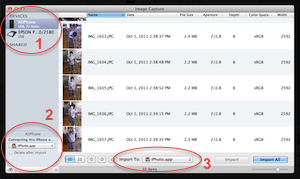
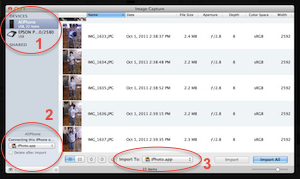
In the upper left corner (1), you can see your scanner and any other cameras or devices you have plugged into your computer. Click on each one to access its tools. Here you can use your scanner, even if you don’t have the original software!

In the lower left corner (2) is a CRUCIAL place to set what happens when you plug anything into your computer. If you find it annoying when iPhoto opens every time you plug in your iPhone, change this drop-down to None!

I used this setting to troubleshoot a problem with iPhoto. I had a customer whose iPhoto ’11 was hanging up every time she opened it – the spinning beach ball wouldn’t stop, and she had to Force Quit the application every time. I changed the setting from “None” to “iPhoto”, and the problem was solved!

The option at the bottom (3) is set when you use Image Capture as your import utility. It gives you MUCH more flexibility than iPhoto, or any other method of importing your pictures into your computer. Here you can tell it to import your pictures into a folder, iPhoto, Aperture, Preview, or even Mail. You can also assign any other application, such as Photoshop.


Picture of Alicia Katz Pollock
Alicia Katz Pollock
Recently named one of America's Top 50 Women in Accounting, Alicia is a leading expert in QuickBooks Online training with a Masters in Teaching and decades of business consulting. She offers a range of tailored resources from self-paced courses to personalized coaching. Known for her patience and commitment, Alicia simplifies QuickBooks for clients, helping them achieve their financial management goals with ease.
Picture of Alicia Katz Pollock
Alicia Katz Pollock
Recently named one of America's Top 50 Women in Accounting, Alicia is a leading expert in QuickBooks Online training with a Masters in Teaching and decades of business consulting. She offers a range of tailored resources from self-paced courses to personalized coaching. Known for her patience and commitment, Alicia simplifies QuickBooks for clients, helping them achieve their financial management goals with ease.
Don't forget to share this post.
Related Articles
Episode 142 | It’s Recertification Season | Royalwise
QuickBooks
Alicia Katz Pollock
It’s Recertification Season! – Podcast

Podcast Episode Overview Alicia and guest Matthew Fulton break down everything covered on the QuickBooks Online ProAdvisor Level 1 and Level 2 recertification exams, from test-taking strategies to a deep walkthrough of the new features Intuit is testing you on. Along the way they unpack the expanded AI capabilities built into QBO, including the business feed, Finance AI, the Customer

Read More »
Episode 141 | Why Brilliant Bookkeepers Undervalue Themselves | Royalwise
QuickBooks
Alicia Katz Pollock
Why Brilliant Bookkeepers Undervalue Themselves – Podcast

Podcast Episode Overview In a special crossover episode with the Unofficial QuickBooks Accountants Podcast, Nancy and Questian are joined by Alicia Katz Pollock to dig into why so many technically skilled bookkeepers struggle to charge what they’re worth — and what it takes to bridge the gap between expertise and authority. Alicia gets candid about her own discomfort with pricing,

Read More »
Episode 140 | RIP Classic Reports, Long Live Modern | Royalwise
QuickBooks
Alicia Katz Pollock
RIP Classic Reports, Long Live Modern (with Hector Garcia) – Podcast

Podcast Episode Overview QuickBooks Online is retiring Classic Reports on May 22nd, and Hector Garcia is back to make sure Intuit is listening. He crowd-sourced a massive feedback thread from the accounting community and walks Alicia through what’s still broken in Modern Reports — from PDF formatting and Excel export issues to drill-down behavior, column sorting, and features gated behind

Read More »