What is Image Capture?

Image Capture

Table of Contents

Image CaptureDid you know there’s more than one photo management tool on your computer? In addition to iPhoto, Image Capture is a little program in your Applications folder that has big power.

Image Capture controls what happens when you connect your iPhone, iPad, and digital camera to your computer. For example, you’ve noticed that iPhoto always opens as soon as you plug in your iPhone. This action is actually managed in Image Capture, NOT iPhoto!

Image Capture also allows you to use your scanner without any other software.

So let’s explore this wonderful little program. Go ahead and open up Image Capture now. Then, plug in your camera, iPhone, or iPad with pictures on it.

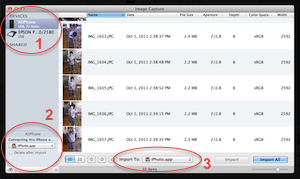
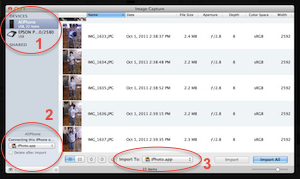
In the upper left corner (1), you can see your scanner and any other cameras or devices you have plugged into your computer. Click on each one to access its tools. Here you can use your scanner, even if you don’t have the original software!

In the lower left corner (2) is a CRUCIAL place to set what happens when you plug anything into your computer. If you find it annoying when iPhoto opens every time you plug in your iPhone, change this drop-down to None!

I used this setting to troubleshoot a problem with iPhoto. I had a customer whose iPhoto ’11 was hanging up every time she opened it – the spinning beach ball wouldn’t stop, and she had to Force Quit the application every time. I changed the setting from “None” to “iPhoto”, and the problem was solved!

The option at the bottom (3) is set when you use Image Capture as your import utility. It gives you MUCH more flexibility than iPhoto, or any other method of importing your pictures into your computer. Here you can tell it to import your pictures into a folder, iPhoto, Aperture, Preview, or even Mail. You can also assign any other application, such as Photoshop.


Picture of Alicia Katz Pollock
Alicia Katz Pollock
Recently named one of America's Top 50 Women in Accounting, Alicia is a leading expert in QuickBooks Online training with a Masters in Teaching and decades of business consulting. She offers a range of tailored resources from self-paced courses to personalized coaching. Known for her patience and commitment, Alicia simplifies QuickBooks for clients, helping them achieve their financial management goals with ease.
Picture of Alicia Katz Pollock
Alicia Katz Pollock
Recently named one of America's Top 50 Women in Accounting, Alicia is a leading expert in QuickBooks Online training with a Masters in Teaching and decades of business consulting. She offers a range of tailored resources from self-paced courses to personalized coaching. Known for her patience and commitment, Alicia simplifies QuickBooks for clients, helping them achieve their financial management goals with ease.
Don't forget to share this post.
Related Articles
Episode 145 | Now You Know, In the Know May 2026 | Royalwise
QuickBooks
Alicia Katz Pollock
Now You Know, In the Know May 2026 – Podcast

Podcast Episode Overview Alicia and Dan DeLong recap Intuit’s May In the Know webinar, led by the big reveal that the ProAdvisor program will sunset in early 2027 and return as Intuit ProPartner Accountants. They break down the three Intuit Accountant Suite tiers (the free Core, the paid Accelerate, and the per-client Books Close add-on), walking through custom fields, KPI

Read More »
Episode 144 | BDO Alliance Evolve 2026 Recap | Royalwise
QuickBooks
Alicia Katz Pollock
BDO Alliance Evolve 2026 Recap – Podcast

Podcast Episode Overview Alicia shares her experience at BDO Evolve 2026, covering the relationship-building mindset that changed how she approached the entire conference and a session on Gen Z in the workplace that has her rethinking how accounting firms onboard and develop new staff. She also reveals that Royal Wise took home a BDO Alliance Award for Growth Strategy and

Read More »
QuickBooks
Alicia Katz Pollock
Boiling Frogs: Some QBO Perspective – Podcast

Podcast Episode Overview Matthew “Spot” Fulton of Parkway Business Solutions rejoins Alicia after a year-long sabbatical to share something surprisingly useful: a totally fresh perspective on QBO’s new interface, AI features, and bank feeds. Having missed the frustrating transition period, Spot logged back in without the emotional baggage of watching features break in real time — and found things better

Read More »