What is Image Capture?

Image Capture

Table of Contents

Image CaptureDid you know there’s more than one photo management tool on your computer? In addition to iPhoto, Image Capture is a little program in your Applications folder that has big power.

Image Capture controls what happens when you connect your iPhone, iPad, and digital camera to your computer. For example, you’ve noticed that iPhoto always opens as soon as you plug in your iPhone. This action is actually managed in Image Capture, NOT iPhoto!

Image Capture also allows you to use your scanner without any other software.

So let’s explore this wonderful little program. Go ahead and open up Image Capture now. Then, plug in your camera, iPhone, or iPad with pictures on it.

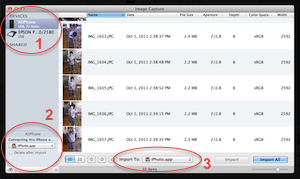
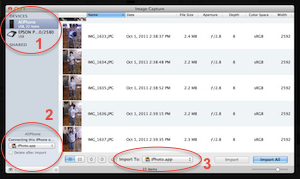
In the upper left corner (1), you can see your scanner and any other cameras or devices you have plugged into your computer. Click on each one to access its tools. Here you can use your scanner, even if you don’t have the original software!

In the lower left corner (2) is a CRUCIAL place to set what happens when you plug anything into your computer. If you find it annoying when iPhoto opens every time you plug in your iPhone, change this drop-down to None!

I used this setting to troubleshoot a problem with iPhoto. I had a customer whose iPhoto ’11 was hanging up every time she opened it – the spinning beach ball wouldn’t stop, and she had to Force Quit the application every time. I changed the setting from “None” to “iPhoto”, and the problem was solved!

The option at the bottom (3) is set when you use Image Capture as your import utility. It gives you MUCH more flexibility than iPhoto, or any other method of importing your pictures into your computer. Here you can tell it to import your pictures into a folder, iPhoto, Aperture, Preview, or even Mail. You can also assign any other application, such as Photoshop.


Picture of Alicia Katz Pollock
Alicia Katz Pollock
Recently named one of America's Top 50 Women in Accounting, Alicia is a leading expert in QuickBooks Online training with a Masters in Teaching and decades of business consulting. She offers a range of tailored resources from self-paced courses to personalized coaching. Known for her patience and commitment, Alicia simplifies QuickBooks for clients, helping them achieve their financial management goals with ease.
Picture of Alicia Katz Pollock
Alicia Katz Pollock
Recently named one of America's Top 50 Women in Accounting, Alicia is a leading expert in QuickBooks Online training with a Masters in Teaching and decades of business consulting. She offers a range of tailored resources from self-paced courses to personalized coaching. Known for her patience and commitment, Alicia simplifies QuickBooks for clients, helping them achieve their financial management goals with ease.
Don't forget to share this post.
Related Articles
Episode 148 | Intuit’s Q3 Earnings Report | Royalwise
QuickBooks
Alicia Katz Pollock
Intuit’s Q3 Earnings Report – Podcast

Podcast Episode Overview Intuit’s Q3 fiscal 2026 earnings call was packed with numbers, and with her co-hosts sitting this one out, Alicia goes through them one by one to explain what each actually signals for bookkeepers, accountants, and QuickBooks users. She breaks down the strength of QuickBooks Online and mid-market growth, the slowdown in Desktop and Mailchimp, AI already running

Read More »
Episode 147 | QBO Snooze You Lose! | Royalwise
QuickBooks
Alicia Katz Pollock
QBO Snooze You Lose! – Podcast

Podcast Episode Overview Alicia runs through the latest round of Intuit announcements, including invoice deposits, garnishment tracking in Payroll, batch bill pay for up to 50 payments at once, and a redesigned review-and-pay screen that now shows clients every open invoice. She also gets a little cynical about Intuit’s growing push to surface its own experts inside QuickBooks, where clients

Read More »
Episode 146 | 17% Layoffs, 83% Reorg | Royalwise
QuickBooks
Alicia Katz Pollock
17% Layoffs, 83% Reorg – Podcast

Podcast Episode Overview Intuit just cut 17% of its workforce, roughly 3,000 employees, and Alicia is joined by Dan DeLong and Matthew “Spot” Fulton to unpack what actually happened and why it isn’t the AI story everyone assumed. Drawing on Dan’s 18 years inside the company, they break down the real drivers behind the cuts, the unusually generous severance packages,

Read More »