Using PayPal Credit in QuickBooks Online…and why you shouldn’t

PayPal Credit

Table of Contents

PayPal has a new service called PayPal Credit. It’s a credit card, sort of.

By default, if you don’t have enough money in your PayPal account for a purchase, PayPal transfers money out of your bank account automatically. If you turn on PayPal Credit, this balance will accumulate in your credit account by instead.

The benefit is that instead of constant charges hitting your bank account (some of them partial because you had some money in your PayPal account but not enough), you only have one total bill to pay at the end of the month.

But that’s the only benefit. The drawbacks are plenty.

First, PayPal Credit’s interest rate is 19.99%. They offer a promotional period of no interest for 6 months…but the fine print is telling:
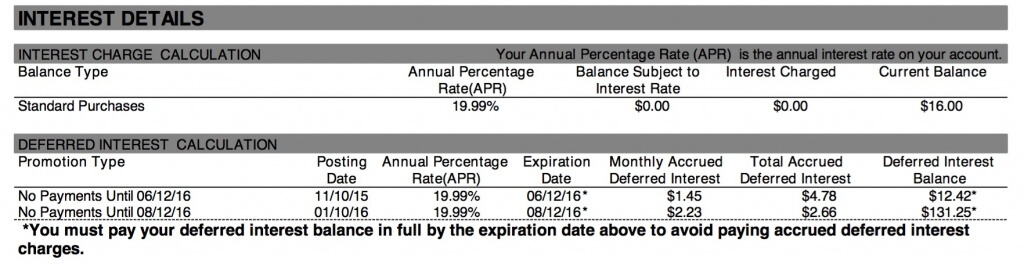
PayPal Credit Deferred Interest Terms

Even though you don’t pay interest when you open the account, you’re still accumulating interest that will come due when your promotion expires, if your purchases haven’t been paid in full.

The second drawback is how confusing PayPal Credits looks inside accounting software like QuickBooks Online. Not only do you see the actual expense in your PayPal register, but you also see the charges listed in your PayPal Credit Card register. Then when you pay the outstanding balance, you see the payment in your bank account, and the money goes to your PayPal account…and then gets transferred to the PayPal Credit account.

It’s so confusing that unless you are extremely careful, you can duplicate your expense up to four times!

To prevent this, only categorize the expense when you’re looking at the PayPal register. Don’t track the PayPal Credit card expenses at all. Use Transfers to move money between PayPal, your bank account, and PayPal Credit.

To see a demonstration, please watch our video on YouTube:

Picture of Alicia Katz Pollock
Alicia Katz Pollock
Recently named one of America's Top 50 Women in Accounting, Alicia is a leading expert in QuickBooks Online training with a Masters in Teaching and decades of business consulting. She offers a range of tailored resources from self-paced courses to personalized coaching. Known for her patience and commitment, Alicia simplifies QuickBooks for clients, helping them achieve their financial management goals with ease.
Picture of Alicia Katz Pollock
Alicia Katz Pollock
Recently named one of America's Top 50 Women in Accounting, Alicia is a leading expert in QuickBooks Online training with a Masters in Teaching and decades of business consulting. She offers a range of tailored resources from self-paced courses to personalized coaching. Known for her patience and commitment, Alicia simplifies QuickBooks for clients, helping them achieve their financial management goals with ease.
Don't forget to share this post.
Related Articles
QuickBooks Online Training Blog | Header Image | Royalwise
QuickBooks
Alicia Katz Pollock
The QuickBooks Online Training Revolution Has Begun

(Watch the video above to hear the full story straight about QuickBooks Online Training from Alicia Katz Pollock.) The accounting industry is undergoing a seismic shift. What used to be a solo bookkeeper’s job is now handled by entire departments inside CAS practices and tax firms. The pressure is on for staff at all levels to really know what they’re doing in

Read More »
QuickBooks Online Reports
QuickBooks
Alicia Katz Pollock
Unlocking the Power of QuickBooks Online Reports

Unlocking the Power of QuickBooks Online Reports: A Deep Dive for Bookkeepers and Business Owners Let’s face it, we all love those satisfying “cha-chings” as payments hit our bank accounts. But as bookkeepers and business owners, we know that the true story of our financial health lies deeper, within the reports nestled inside QuickBooks Online (QBO). It’s easy to get

Read More »
Year-end Cleanup in QuickBooks Online
QuickBooks
Payden Miller
Year-End Cleanup in QuickBooks Online: Your Guide to a Sparkling Clean Start!

Hey everyone, Alicia Katz Pollock here! As we gear up for tax season, I want to talk about one of my favorite topics: Year-end Cleanup in QuickBooks Online. Yes, I know, “cleanup” doesn’t usually spark joy, but trust me, a little QBO spring cleaning can make a world of difference for your peace of mind and, most importantly, for accurate

Read More »