When Personal.XLSB in Excel fails to load

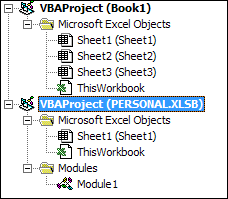
personal.xlsb doesn't load

Table of Contents

personal.xlsb doesn't loadI spent several hours today creating an extensive Excel Macro to combine two reports exported out of QuickBooks Premier. I created a Customer:Job Status report and a Job Profitability report, blending them into an Excel table that would allow my client to filter by Job Status, and use Conditional Formatting to colorize it based on profit margin by Job Type.

It was a great project, and it worked well, allowing her to do in two minutes what had taken them hours…until it suddenly stopped.

I had exported my two .bas Modules out of the Personal Macro workbook and imported them into the Personal Macro Workbook on another computer. I ran them once and they worked.

But when it came time to train my client, nothing happened when I pressed the keyboard shortcuts.

Without warning the keystrokes to invoke the macros stopped working. I could no longer create or save macros without getting a message that there was no Personal.xlbs file. The buttons I had added to the Quick Access Toolbar gave me error messages.

What was wrong? I began my internet research, and followed every step from every help article.

…the Personal.xlsb failed to load, so go find it in the XLSTART folder…not there.

…Enable all Trust Settings for Macros…well, most of them.

…Enable the Macro Add-ons…nothing was disabled.

…View the Personal.xlsb hidden workbook and modify it…but it wasn’t there anymore.

I tried everything and nothing worked. I even called two colleagues who had no answers for me.

After 90 minutes, you know what I did to solve it?

Restart the computer. Open Excel to a new blank workbook. THEN export the reports out of QuickBooks to Excel.

It’s so simple…but it worked!

Picture of Alicia Katz Pollock
Alicia Katz Pollock
Recently named one of America's Top 50 Women in Accounting, Alicia is a leading expert in QuickBooks Online training with a Masters in Teaching and decades of business consulting. She offers a range of tailored resources from self-paced courses to personalized coaching. Known for her patience and commitment, Alicia simplifies QuickBooks for clients, helping them achieve their financial management goals with ease.
Picture of Alicia Katz Pollock
Alicia Katz Pollock
Recently named one of America's Top 50 Women in Accounting, Alicia is a leading expert in QuickBooks Online training with a Masters in Teaching and decades of business consulting. She offers a range of tailored resources from self-paced courses to personalized coaching. Known for her patience and commitment, Alicia simplifies QuickBooks for clients, helping them achieve their financial management goals with ease.
Don't forget to share this post.
Related Articles
QuickBooks Online Training Blog | Header Image | Royalwise
QuickBooks
Alicia Katz Pollock
The QuickBooks Online Training Revolution Has Begun

(Watch the video above to hear the full story straight about QuickBooks Online Training from Alicia Katz Pollock.) The accounting industry is undergoing a seismic shift. What used to be a solo bookkeeper’s job is now handled by entire departments inside CAS practices and tax firms. The pressure is on for staff at all levels to really know what they’re doing in

Read More »
QuickBooks Online Reports
QuickBooks
Alicia Katz Pollock
Unlocking the Power of QuickBooks Online Reports

Unlocking the Power of QuickBooks Online Reports: A Deep Dive for Bookkeepers and Business Owners Let’s face it, we all love those satisfying “cha-chings” as payments hit our bank accounts. But as bookkeepers and business owners, we know that the true story of our financial health lies deeper, within the reports nestled inside QuickBooks Online (QBO). It’s easy to get

Read More »
Year-end Cleanup in QuickBooks Online
QuickBooks
Payden Miller
Year-End Cleanup in QuickBooks Online: Your Guide to a Sparkling Clean Start!

Hey everyone, Alicia Katz Pollock here! As we gear up for tax season, I want to talk about one of my favorite topics: Year-end Cleanup in QuickBooks Online. Yes, I know, “cleanup” doesn’t usually spark joy, but trust me, a little QBO spring cleaning can make a world of difference for your peace of mind and, most importantly, for accurate

Read More »