QuickBooks Credit Cards: Pay Down Credit Card in QuickBooks Online
Look What I Found! A simple way to pay down your credit card balance in QuickBooks Online – one of countless insights available to you through our plethora of QuickBooks training offerings!
Paying off credit cards has always been a bit of a bugaboo in QuickBooks. There are several ways of working with Business Credit Cards, which I discuss in detail in my 90-minute course at http://royl.ws/QBO-credit-cards.
Importing QuickBooks Credit Card Transactions
No matter what, the workflow you DON’T want to do is enter a Check to your credit card company (Chase, AmEx, BofA, etc). I’ve seen clients write a check with dozens of line items for each expense category, sitting there with a calculator to total up all the charges for Meals, Gas, Utilities, and Supplies. That can take hours, especially if you punch in the wrong numbers and have NO idea which account is off.
What you DO want to do is connect all your credit cards to the Banking Feed to import the transactions. That way you have a record of every individual expense, including which Vendor you paid. You’re not limited to a grand total on a P&L and Balance Sheet.
Paying Credit Cards in QuickBooks Online
There’s also a running debate between bookkeepers about whether to use an Expense or a Transfer for the credit card payment. An Expense is more involved, with the CC Company as the Payee, the Checking account at the top, and the Credit Card account in the line item at the bottom.
Many people find it easier just to enter a Transfer between the Checking account and the Credit Card.
Both of these methods are slightly more complicated if you have a corporate card with subcards. In that situation, you connect the subcards to the Banking Feed but not the root corporate account…but you only reconcile that root card. Unfortunately, some banks apply the payment to the root card, others to the primary cardholder. This topic is too complex for today’s article, but I demonstrate corporate credit cards in my Credit Cards in Business, and it’s worth a look.
The Solution
Now that I’m done preaching to the choir, let’s look at QBO’s new feature. The value here is that the consistent workflow ends all the confusion.
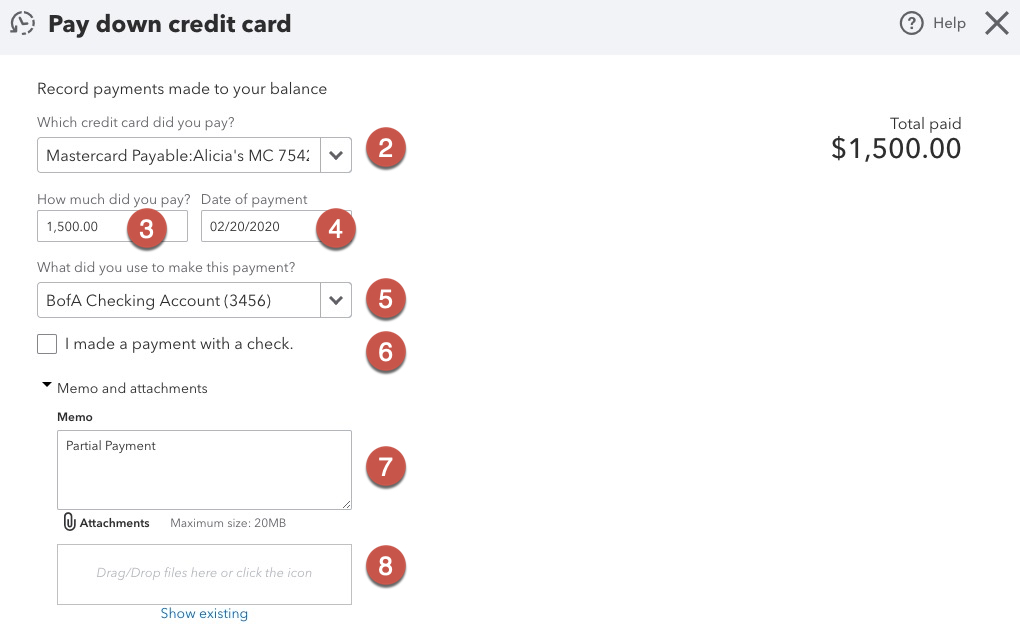
- Click on the +New menu on the far right, then “Pay Down Credit Card.”
- Choose which credit card you’re paying. If it’s a Corporate Card with subcards, most of the time the payment will be applied to the main account (you’ll see it in the Checking account’s Banking Feed but not in the card’s). Some companies, like Bank of America, apply the payment to the primary card (you will see it in the card’s bank feed).
- Enter the payment amount. Note that it doesn’t matter whether you’re paying in full or making a partial payment.
- Enter the date you make the payment.
- Enter the Checking account you’re paying with.
- If you’re paying by paper check, check the box (paying online is sooo much easier!).
- Enter a memo if you’d like.
- If you have a PDF of the credit card statement, you can Attach it to the payment (optional).
The transactions are now in both registers. It will Match in your Checking Banking Feed, and be available when you Reconcile your credit card.
Pay Down Credit Card & More QuickBooks Credit Card Training
In Intuit’s quest to make bookkeeping accessible to DIY business owners, the new Pay Down Credit Card feature makes the workflow transparent and seamless. It’s a great solution to a problem bookkeepers spend too much time repairing!
For more QuickBooks training, classes and community, click below!