Days
Hours
Minutes
Seconds

LIVE TRAINING

Customizing QBO

Learn to customize your QuickBooks Online dashboard, navigation, invoices, and bank feeds.

Save a Version, Duplicate, Revert, and Resume in Lion

Lion’s Save a Version, Duplicate, Revert, and Resume

Table of Contents

Lion’s Save a Version, Duplicate, Revert, and ResumeWith OS X 10.7 Lion, Apple is changing the way we’re all used to saving documents. Why? Have you ever forgotten to Save a document and lost it? Or forgotten to do a Save As and overwritten your content? Or deleted something, saved over it, and lost it forever?

The good new is… NEVER AGAIN! The bad news is they’ve changed the jargon and steps that we all know and love. It takes a little getting used to.

Let’s explore how they work.

Save a Version

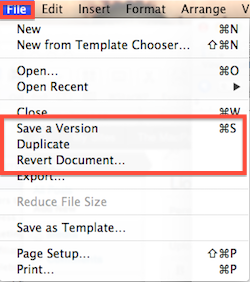
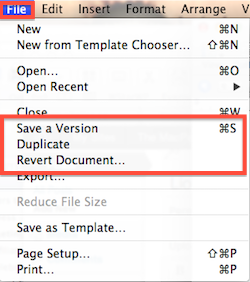
Apple now AutoSaves your work every few minutes. You can still use Command-S or File>Save a Version to save it yourself any time.

Revert Document

If you make changes but want to go back to a document the way it used to be, you can literally go back in time using this command on the File menu. It opens a Time Machine-like interface so you can scan through the history of the document, every time you or your computer saved a version.

Not only can you revert back to the way the document was before you made a bunch of changes, but you can even copy some text out of it and paste it into your current copy!

Duplicate

This is pretty much the same as the old Save As. However, instead of renaming it immediately, it just makes a new copy. You then have to take the extra step to Save it, giving it a name and location.

If you made unsaved changes to the original, and then click on Duplicate, it will ask you if you want to Revert the original back to the last saved version, or keep it as is.

Resume

When you quit a program, it automatically saves your changes. When you open the program again, it will immediately open your file. Since so much of the time you’re returning to an existing document you were just working on, this saves you a bunch of time.

The change to your workflow, though, is that you’re probably used to just quitting a program to close a document. Now you have to click the red dot in its corner to officially close it.

While at first these new commands are confusing, with this system there is NO way for you to accidentally overwrite a critical file. It saves time from opening the same file over and over. And it gives you a version history so you can rescue old content.

These three benefits make the learning curve very well worth it.

Picture of Alicia Katz Pollock
Alicia Katz Pollock
Recently named the 2026 Top ProAdvisor Educator by Insightful Accountant, Alicia is a nationally recognized QuickBooks Online expert with a Master’s in Teaching and decades of business consulting experience. Known for her patience, commitment, and approachable teaching style, she makes QuickBooks easier to understand for small business owners and accounting professionals alike, helping them build the skills they need to manage their finances with clarity and ease.
Picture of Alicia Katz Pollock
Alicia Katz Pollock
Recently named the 2026 Top ProAdvisor Educator by Insightful Accountant, Alicia is a nationally recognized QuickBooks Online expert with a Master’s in Teaching and decades of business consulting experience. Known for her patience, commitment, and approachable teaching style, she makes QuickBooks easier to understand for small business owners and accounting professionals alike, helping them build the skills they need to manage their finances with clarity and ease.
Don't forget to share this post.
Related Articles
Episode 152 | Now You Know: In the Know July 2026 Recap | Royalwise
QuickBooks
Alicia Katz Pollock
Now You Know: In the Know July 2026 Recap – Podcast

Podcast Episode Overview Alicia and Matthew break down Intuit’s July “In the Know” session, covering 175 behind-the-scenes fixes to bank matching, reports, and load times, plus a first look at the new unified inbox coming to QuickBooks Online this August. They also dig into the new Intuit Experts toggle that determines whether Intuit can market services directly to your clients,

Read More »
Episode 151 | Resilience in the Face of Change | Royalwise
QuickBooks
Alicia Katz Pollock
Resilience in the Face of Change – Podcast

Podcast Episode Overview Alicia sits down with longtime friend and Intuit Trainer/Writer Network co-founder Alison Ball to trace her path from Intuit through Liscio and BookKeep to running her own consulting practice as a trusted sounding board for tech companies and practitioners alike. Alison breaks down why so many accounting tech products stumble (hint: they skip the accountants), shares Blake

Read More »
Episode 150 | The ProPartner Paradox | Royalwise
QuickBooks
Alicia Katz Pollock
The ProPartner Paradox – Podcast

Podcast Episode Overview Alicia and returning guest Margie Remmers-Davis unpack the ProAdvisor program’s transformation into ProPartner, from the Intuit Connect stage mishap that sparked panic to what the new tiers, three-year revenue share, and Career Pipeline Program actually mean for practitioners. They also dig into why the name change hits differently after a decade of Intuit pushing bookkeepers toward advisory

Read More »