Days
Hours
Minutes
Seconds

QuickBooks Online

Complete Hands-On Training

Learn QuickBooks Online in 12 weeks with our hands-on step-by-step guided course.

Do you have drafts left in your folder, even after sending?

IMAP Drafts

Table of Contents

IMAP DraftsSometimes I work on a message in Apple Mail, and temporarily save it to my Drafts folder. When I open it again, finish it, then send it, occasionally it stays in my Drafts even though I can see that it was Sent. I can manually delete it, but there’s got to be a better way.

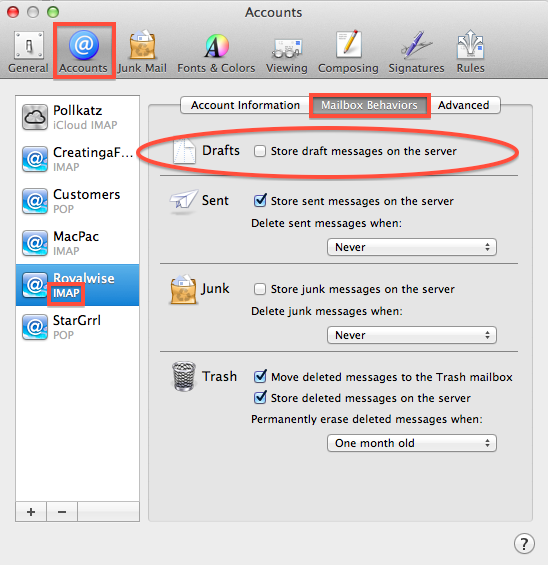
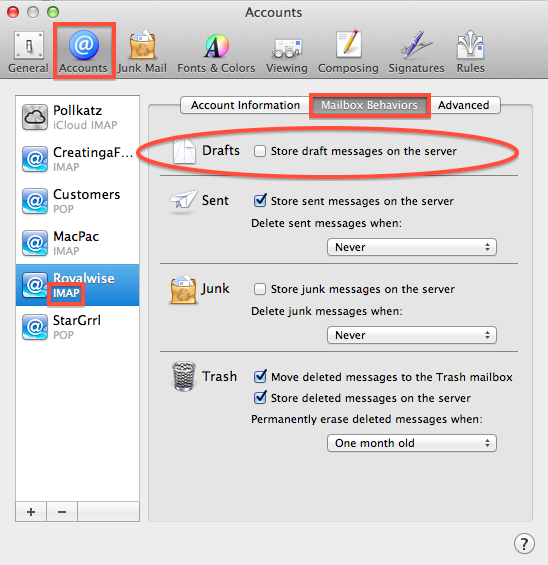
Go to the Mail menu and choose Preferences. Click on the Accounts button at the top. Click on the email account that has the issue. In the right pane, click on the Mailbox Behaviors tab.

Is there a checkmark in front of “Store Drafts messages on the server”? If so, uncheck it. From then on, drafts will only be saved on your computer, and not on your iPhone or iPad…but they won’t get stuck in your Drafts folder anymore!

Repeat this step for all other IMAP accounts you may have.

(Note that this option has been removed as of OS 10.12 Sierra).

Picture of Alicia Katz Pollock
Alicia Katz Pollock
Recently named one of America's Top 50 Women in Accounting, Alicia is a leading expert in QuickBooks Online training with a Masters in Teaching and decades of business consulting. She offers a range of tailored resources from self-paced courses to personalized coaching. Known for her patience and commitment, Alicia simplifies QuickBooks for clients, helping them achieve their financial management goals with ease.
Picture of Alicia Katz Pollock
Alicia Katz Pollock
Recently named one of America's Top 50 Women in Accounting, Alicia is a leading expert in QuickBooks Online training with a Masters in Teaching and decades of business consulting. She offers a range of tailored resources from self-paced courses to personalized coaching. Known for her patience and commitment, Alicia simplifies QuickBooks for clients, helping them achieve their financial management goals with ease.
Don't forget to share this post.
Related Articles
Episode 124 | Now You Know; QuickBooks December 2025 Updates | Blog Header | Royalwise
QuickBooks
Alicia Katz Pollock
Now You Know; QuickBooks December 2025 Updates (Podcast)

Podcast Episode Overview Alicia breaks down Intuit’s December In the Know session, covering three major updates for accountants managing multiple clients and entities. She explains the new consolidated view and dynamic allocations in Intuit Enterprise Suite, walks through the Books Close beta feature that lets you work across client files from a single dashboard, and details the long-awaited realm consolidation

Read More »
Episode 123 | New Year, New Innovations! | Blog Header | Royalwise
QuickBooks
Alicia Katz Pollock
New Year, New Innovations! (Podcast)

Podcast Episode Overview Alicia and Dan kick off 2026 by diving into 27 pages of notes from Intuit Connect’s Innovation Circle. They break down upcoming changes to bank feeds (including confidence indicators and MasterCard receipt capture), the new payroll agent that handles timesheets via text message, enhanced tax impoundment processes, and Intuit Intelligence’s business analytics features. Most innovations are rolling

Read More »
Episode 122 | Christmas Gifts from Intuit!(Look What I Found Dec 2025) | Blog Header | Royalwise
QuickBooks
Alicia Katz Pollock
Christmas Gifts from Intuit! Look What I Found Dec 2025 (Podcast)

Podcast Episode Overview Alicia runs through the latest QuickBooks Online updates rolling out this holiday season, from enhanced client request routing in the banking feed to the completely redesigned sales tax center. She covers new time tracking integrations, the text-based payroll agent, modern report improvements, and explains why toggling that sales tax checkbox doesn’t actually change product taxability—a common source

Read More »