3 Ways to Insert the Date in Microsoft Word Docs

Inserting the date with autofill

Table of Contents

If you need to insert the date in your documents, save time by using these shortcuts instead of typing.
Inserting the date with autofill

Insert As You Type

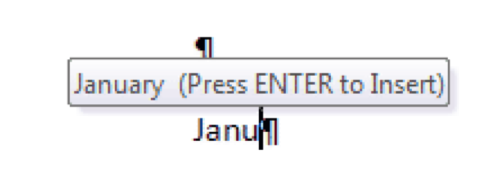
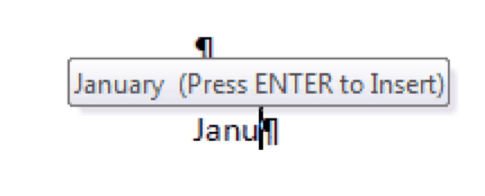
As you type the date in your document, Tooltips appear that predict what you’re going to type. Press Enter to accept the suggestion. For example, as you start typing “Janu”, Word suggests “January,” and you press Enter to insert it. If you keep typing the rest of the date, it may offer to autofill in the day and the year as well.
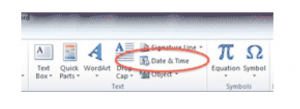
Inserting today's date and timeInsert Today’s Date and Time

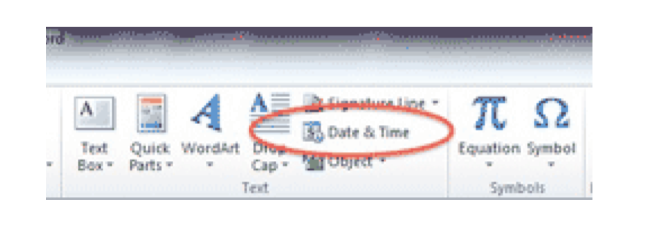
Click on the document where you want to put the date. Go to the INSERT RIBBON, and choose DATE AND TIME on the far right. Select how the date should look. To always use this style, click the SET AS DEFAULT button.
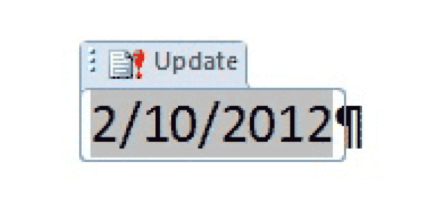
Insert the date with a keyboard shortcut

Use a Keyboard Shortcut

You can also insert the date with the keystroke ALT-SHIFT-D. This inserts the date as a field — click on it to see the field container. To change the format, use the instructions above to change the Default style, and reinsert the field. The field maintains the original date. Click on the UPDATE button to change it to today’s date.

Buy the Book
Microsoft Word 2010 Tips & TricksFor the complete collection of time-saving tips and tricks, buy my book, Microsoft Word 2010 Tips & Tricks. Available in eBook, iBook, Multi-touch, and paperback versions.



Picture of Alicia Katz Pollock
Alicia Katz Pollock
Recently named one of America's Top 50 Women in Accounting, Alicia is a leading expert in QuickBooks Online training with a Masters in Teaching and decades of business consulting. She offers a range of tailored resources from self-paced courses to personalized coaching. Known for her patience and commitment, Alicia simplifies QuickBooks for clients, helping them achieve their financial management goals with ease.
Picture of Alicia Katz Pollock
Alicia Katz Pollock
Recently named one of America's Top 50 Women in Accounting, Alicia is a leading expert in QuickBooks Online training with a Masters in Teaching and decades of business consulting. She offers a range of tailored resources from self-paced courses to personalized coaching. Known for her patience and commitment, Alicia simplifies QuickBooks for clients, helping them achieve their financial management goals with ease.
Don't forget to share this post.
Related Articles
1099s in QuickBooks Online
QuickBooks
Alicia Katz Pollock
Navigating 1099s in QuickBooks Online: Your Guide to Stress-Free Filing

Hey everyone, Alicia Katz Pollock from Royalwise.com here. It’s that time of year again – 1099 season! While this task can feel daunting, especially with ever-evolving regulations, QuickBooks Online (QBO) offers tools to help streamline the process. Intuit continues to revamp the 1099 filing process based on user feedback, making it even more efficient. This blog post will guide you

Read More »
How to Backup Your QuickBooks Online Data
QuickBooks
Alicia Katz Pollock
Baby Got Backups: Why and How to Backup Your QuickBooks Online Data

Hey everyone, Alicia Katz Pollock here from Royalwise.com! Today, I’m diving into a topic that often gets overlooked, but is absolutely crucial for any business using QuickBooks Online (QBO): how to backup your QuickBooks Online data. Even though your company file is stored in the cloud, relying solely on Intuit’s servers for protection leaves you vulnerable to accidental deletions, data

Read More »
Advanced Bookkeeping in QuickBooks Online
QuickBooks
Alicia Katz Pollock
Advanced Bookkeeping in QuickBooks Online: Moving Beyond the Basics

So, you’ve mastered the basics of QuickBooks Online (QBO). You can send invoices, categorize transactions, and run basic reports. That’s fantastic! But are you ready to take your skills to the next level with advanced bookkeeping in QuickBooks Online? This isn’t about clicking the right buttons; it’s about understanding the deeper bookkeeping principles and using QBO’s features creatively to get

Read More »