Using the Microsoft Word Navigation Pane Like a Pro

word navigation pane

Table of Contents

Microsoft Word's Navigation PaneMicrosoft Word Navigation Pane 101


Have you ever heard of Word’s Navigation Pane? It’s a sidebar you can view on the left of your document that allows you to move more quickly through your Word document. Use it to browse your document by Headings, Thumbnails, and Searching for words. To turn it on using a PC, go to the VIEW Tab and put a CHECK in front of NAVIGATION PANE. On a Mac, go to the VIEW menu and highlight SIDEBAR, then select any of the choices there.


Browse by Headings


To browse by Headings, you need to format your sections using the Styles gallery, using the Heading 1, Heading 2, and Heading 3 styles. Once you’ve applied this organizational formatting, the FIRST VIEW in the Navigation Pane becomes a list of your sections and subsections.

A tiny triangle appears before each heading level that has subsections. Click on the TRIANGLE to expand and collapse the list. Second-level headings are slightly indented.

Click on the HEADINGS to jump to that section. On a PC, use the UP AND DOWN arrows to skip from section to section. Click and drag the SECTION BARS to rearrange the document. Much faster than cutting and pasting!

The PC version of Word also allows you to instantly change between Heading 1, 2, or 3 styles, and change the section’s indent. Right-click on a SECTION and choose PROMOTE or DEMOTE.


Navigate by Thumbnail


Thumbnails show tiny previews of each page so that you can jump around by appearance.

On a PC, click on the SECOND Tab to see a picture of each page (on a Mac, it’s the FIRST button).

Click on the PREVIEWS to move from page to page.


Locate Using Search in the Navigation Pane


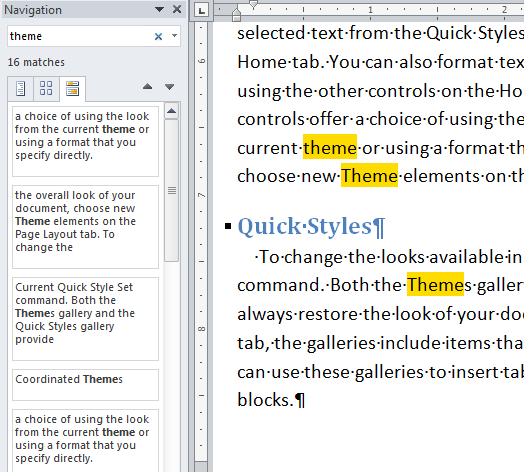
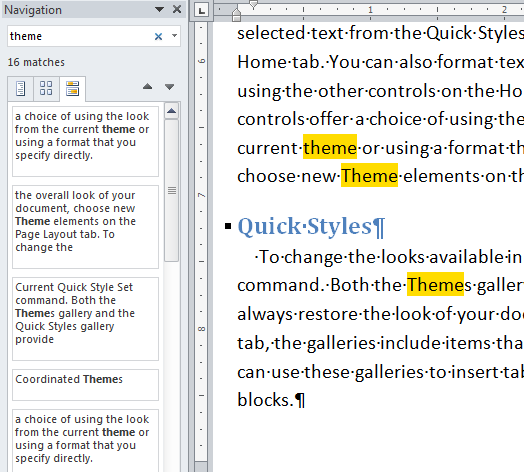
Click on the THIRD Tab for a SEARCH BOX. On a Mac, it’s the FOURTH button.

When you type in A WORD OR A PHRASE, all occurrences become highlighted in yellow, and are listed in the Navigation Pane along with their context.

Click on EACH MATCH or use the UP AND DOWN ARROWS to visit each one.

On a Mac, you can also use this pane as a Find and Replace tool!


More Microsoft Word Training Resources

For more Microsoft Office classes online, along with on-demand videos, support community more, consider joining our amazing mentorship program – click below!

microsoft office training


Picture of Alicia Katz Pollock
Alicia Katz Pollock
Recently named one of America's Top 50 Women in Accounting, Alicia is a leading expert in QuickBooks Online training with a Masters in Teaching and decades of business consulting. She offers a range of tailored resources from self-paced courses to personalized coaching. Known for her patience and commitment, Alicia simplifies QuickBooks for clients, helping them achieve their financial management goals with ease.
Picture of Alicia Katz Pollock
Alicia Katz Pollock
Recently named one of America's Top 50 Women in Accounting, Alicia is a leading expert in QuickBooks Online training with a Masters in Teaching and decades of business consulting. She offers a range of tailored resources from self-paced courses to personalized coaching. Known for her patience and commitment, Alicia simplifies QuickBooks for clients, helping them achieve their financial management goals with ease.
Don't forget to share this post.
Related Articles
QuickBooks
Payden Miller
Author’s new book receives a warm literary welcome.

Author’s new book receives a warm literary welcome. Readers’ Favorite announces the review of the Non-Fiction – Business/Finance book “QuickBooks Online Bootcamp” by Alicia Katz Pollock, currently available at http://www.amazon.com/gp/product/0989399265. Readers’ Favorite is one of the largest book review and award contest sites on the internet. They have earned the respect of renowned publishers like Random House, Simon & Schuster,

Read More »
QBO Bootcamp Press Release | Blog Header Image | Royalwise
QuickBooks
Payden Miller
How QBO Bootcamp is Changing the Game for Small Business Owners

If you’ve ever felt overwhelmed by your business finances, you’re not alone. Managing books, keeping up with tax prep, and understanding accounting software can be daunting—especially for small business owners. But a new book by Alicia Katz Pollock, QBO Bootcamp: From Setup to Tax Time, is here to help—and it’s already receiving glowing praise. A 5-Star Guide That Makes Finance Manageable

Read More »
Two Accounting Apps | Blog Post Header Image | Royalwise
QuickBooks
Brandon Mateika
When Two Accounting Apps Listen to Their Customers (And Actually Do Something About It)

Picture this: It’s 2021 at ‘Appy Camp, and Ben Stein from Keeper is standing at a bar, drink ticket in hand, ready to exchange it for a well-deserved cocktail after a long day of conference sessions. But when Alicia Katz Pollock rushes past—bass guitar case slung over her shoulder, racing to join the evening’s music circle around the fire—and tosses him

Read More »