 Apples to Apples vs Apples to Oranges? Just drink the Kool-Aid!
I often get asked, “Why should I use Apple Mail instead of Outlook for Mac 2011, or gmail.com web mail?
The number one reason is INTEGRATION. Apple Mail is so well integrated with the Mac OSX operating system, and other Apple applications, that you lose a lot of cool features and productivity opportunities.
A second compelling reason to switch from Outlook for Mac to Apple Mail is bugs in the software. In the last month I’ve had two different Outlook for Mac 2011 users call me because they lost data with in Outlook.
Here is a list of features that are integrated between Apple applications: Mail, Calendar, Contacts, iPhoto, Safari and more:
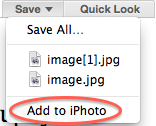 Mail to iPhoto – when you receive an email with photo attachments in the message, click the Details link in the header, and the header will expand (this is a 1-time setup). Click the down arrow on the right side of the Save button. Select Add to iPhoto in that drop-down menu. It will automatically import your attached images into your iPhoto library.
- Mail to Contacts – To add someone’s email address to Contacts, float your cursor over their name in the header of the email until it turns blue. Click the white arrow on the right side and select Add to Contacts in the drop-down menu. You will get the option to Create a New Contact or Add to an Existing Contact.
- Mail Data Detectors – Inside of email messages, any piece of data that’s related to a different application will have what is called a Data Detector. Addresses can be added directly to your contacts. Websites can be opened in Safari. Phone numbers can be added to Contacts. Dates and times can be added to the Calendar by clicking the date and time within the message. To take advantage of this feature, place your mouse over the information and it will be outlined with a dotted line. Click the down arrow and select the appropriate option from the drop-down menu.
- Contacts to Calendar – If you use the Birthday field in Contacts, the dates will automatically show up on your calendar with the person’s age in the title of the event! In the Calendar menu, select Preferences. At the bottom of the General tab, check Show Birthdays calendar. (Learn how to add Birthdays to Contacts here).
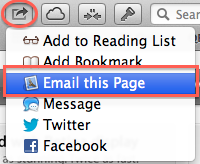 The new Share button was introduced in Mountain Lion 10.7. It can be found in Safari, iPhoto, and even Finder windows. The Share button gives you access to sending content through email, iMessages, and even Facebook and Twitter. You can also share photos and videos through Vimeo and Flickr.
- Safari to Mail – Click the Share button and then choose Email. Once the email is created, choose from the drop-down whether it is in Reader mode, a PDF, a link, or the entire webpage with graphics included.
Gmail users often tell me that they like using gmail.com’s web application. I can’t guarantee that in five years, Google and Apple’s technology will still be compatible. But I can guarantee that Apple technology will always work with Apple technology, so the time to make the conversion is now, while it’s seamless!
If you’re going to give Apple thousands of dollars for hardware, why not leverage their free services? Just drink the Kool-Aid! Don’t limit yourself and miss out on all these cool features.
FYI, I wrote this entire article using the dictation feature on my iPhone 4S. I spoke all of this information into my Evernote app so that I could edit and refine it later.