Use Page Break Before to Start a New Page Automatically

Page Break Before in Microsoft Word

Table of Contents

Page Break Before in Microsoft WordAt the end of a page, Microsoft Word wraps the content to the next page automatically. While most of the time that’s great, sometimes you want certain content to always start on a new page. For example, wouldn’t it be great if every Chapter started on a new page, automatically, without you having to make that happen yourself?

Adding PAGE BREAK BEFORE to text attaches a Page Break to the content itself, instead of adding it in manually. The page break moves with the text.

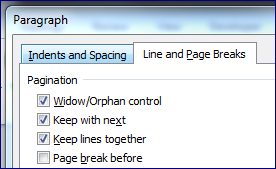
To add this Page Break, select the desired content, and use the LAUNCHER BUTTON in the HOME ribbon to view the PARAGRAPH DIALOG BOX. Click on the LINE AND PAGE BREAKS TAB, and check off PAGE BREAK BEFORE.

A practical use for this is to use the techniques in this post on Styles to add a Page Break Before to your Heading 1 Style, so that every Chapter starts on a new page automatically just because you’ve formatted it as a Heading 1!


Buy the Book
Microsoft Word 2010 Tips & TricksFor the complete collection of time-saving tips and tricks, buy my book, Microsoft Word 2010 Tips & Tricks. Available in eBook, iBook, Multi-touch, and paperback versions.



Picture of Alicia Katz Pollock
Alicia Katz Pollock
Recently named one of America's Top 50 Women in Accounting, Alicia is a leading expert in QuickBooks Online training with a Masters in Teaching and decades of business consulting. She offers a range of tailored resources from self-paced courses to personalized coaching. Known for her patience and commitment, Alicia simplifies QuickBooks for clients, helping them achieve their financial management goals with ease.
Picture of Alicia Katz Pollock
Alicia Katz Pollock
Recently named one of America's Top 50 Women in Accounting, Alicia is a leading expert in QuickBooks Online training with a Masters in Teaching and decades of business consulting. She offers a range of tailored resources from self-paced courses to personalized coaching. Known for her patience and commitment, Alicia simplifies QuickBooks for clients, helping them achieve their financial management goals with ease.
Don't forget to share this post.
Related Articles
QuickBooks Online Training Blog | Header Image | Royalwise
QuickBooks
Alicia Katz Pollock
The QuickBooks Online Training Revolution Has Begun

(Watch the video above to hear the full story straight about QuickBooks Online Training from Alicia Katz Pollock.) The accounting industry is undergoing a seismic shift. What used to be a solo bookkeeper’s job is now handled by entire departments inside CAS practices and tax firms. The pressure is on for staff at all levels to really know what they’re doing in

Read More »
QuickBooks Online Reports
QuickBooks
Alicia Katz Pollock
Unlocking the Power of QuickBooks Online Reports

Unlocking the Power of QuickBooks Online Reports: A Deep Dive for Bookkeepers and Business Owners Let’s face it, we all love those satisfying “cha-chings” as payments hit our bank accounts. But as bookkeepers and business owners, we know that the true story of our financial health lies deeper, within the reports nestled inside QuickBooks Online (QBO). It’s easy to get

Read More »
Year-end Cleanup in QuickBooks Online
QuickBooks
Payden Miller
Year-End Cleanup in QuickBooks Online: Your Guide to a Sparkling Clean Start!

Hey everyone, Alicia Katz Pollock here! As we gear up for tax season, I want to talk about one of my favorite topics: Year-end Cleanup in QuickBooks Online. Yes, I know, “cleanup” doesn’t usually spark joy, but trust me, a little QBO spring cleaning can make a world of difference for your peace of mind and, most importantly, for accurate

Read More »