Power Cutting and Pasting in Word with the Spike

Cut and Paste to the Spike

Table of Contents

cut_paste_spike_microsoft_wordThe “Spike” takes its name from old-fashioned store receipts. When the cashier was done with a customer’s order, they’d slap it onto a metal spike to store the receipt until the end of the day.

In Microsoft Word on a PC, the Spike is like the Clipboard, except it works with Cut items instead of Copied items.

Cut to the Spike

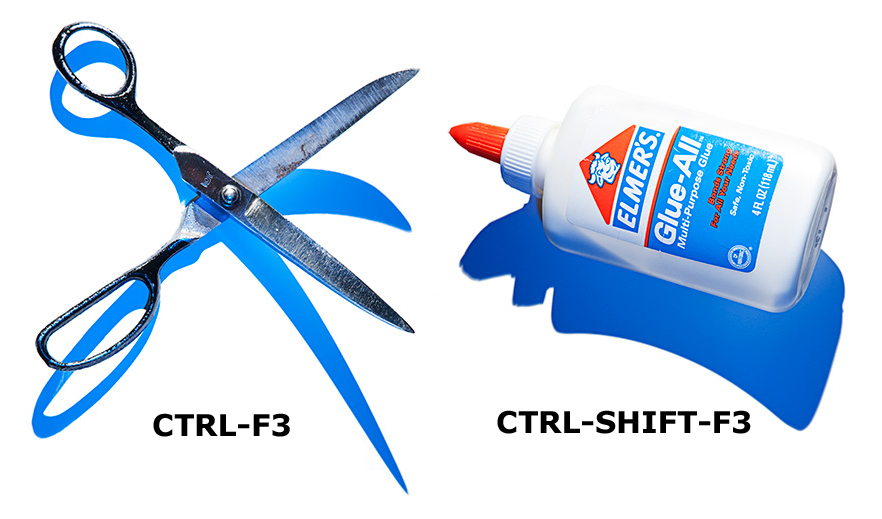
Instead of using CTRL-X to cut your content, use CTRL-F3. This way, all the items you cut are stored for pasting, all in one shot.

Keep cutting until you have all your gathered items.
Cut to the Spike in Microsoft WordPaste to the Spike

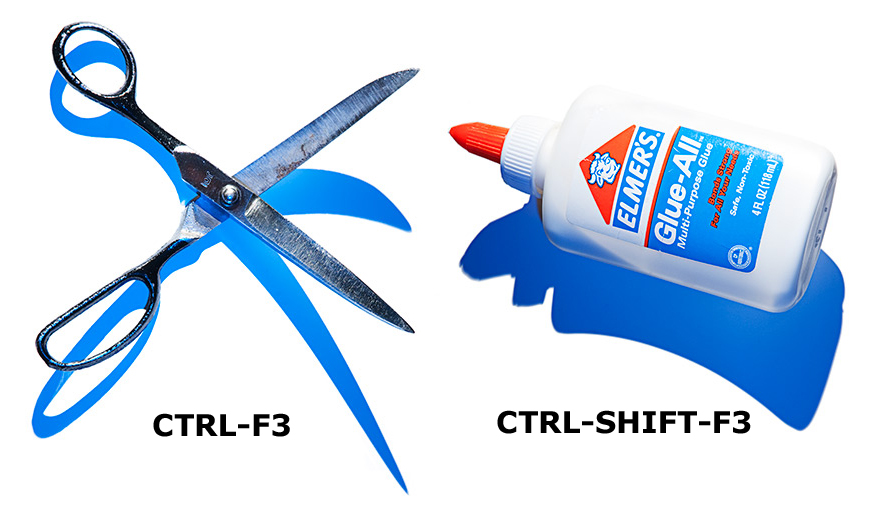
After you’ve cut out all of the items, click where you want to paste all, and press CTRL-SHIFT-F3. All the items appear in the order you cut them, and the Spike is emptied.

If you don’t want to clear the Spike, instead type SPIKE and press F3. The items paste, and are ready to be used again.

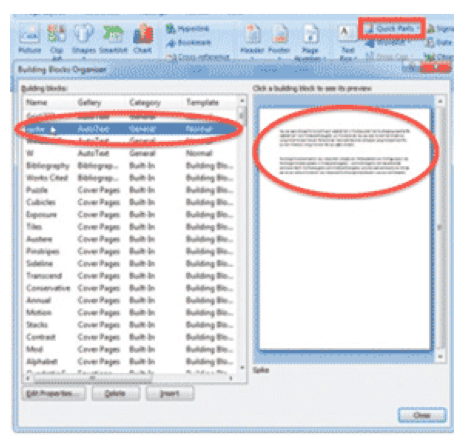
You can also go to the INSERT RIBBON > QUICK PARTS > AUTOTEXT. Find SPIKE on the list, and click on it to paste the Spike.

If Pasting the Spike is including the ¶ at the end of the item, and you need to turn off this behavior, turn off Smart Paragraph Selection.

See the Spike

To see what’s on the Spike, go to INSERT > QUICK PARTS > BUILDING BLOCKS ORGANIZER, and click on SPIKE for a preview of the content.

Buy the Book
Microsoft Word 2010 Tips & TricksFor the complete collection of time-saving tips and tricks, buy my book, Microsoft Word 2010 Tips & Tricks. Available in eBook, iBook, Multi-touch, and paperback versions.



Picture of Alicia Katz Pollock
Alicia Katz Pollock
Recently named one of America's Top 50 Women in Accounting, Alicia is a leading expert in QuickBooks Online training with a Masters in Teaching and decades of business consulting. She offers a range of tailored resources from self-paced courses to personalized coaching. Known for her patience and commitment, Alicia simplifies QuickBooks for clients, helping them achieve their financial management goals with ease.
Picture of Alicia Katz Pollock
Alicia Katz Pollock
Recently named one of America's Top 50 Women in Accounting, Alicia is a leading expert in QuickBooks Online training with a Masters in Teaching and decades of business consulting. She offers a range of tailored resources from self-paced courses to personalized coaching. Known for her patience and commitment, Alicia simplifies QuickBooks for clients, helping them achieve their financial management goals with ease.
Don't forget to share this post.
Related Articles
QuickBooks Online Training Blog | Header Image | Royalwise
QuickBooks
Alicia Katz Pollock
The QuickBooks Online Training Revolution Has Begun

(Watch the video above to hear the full story straight about QuickBooks Online Training from Alicia Katz Pollock.) The accounting industry is undergoing a seismic shift. What used to be a solo bookkeeper’s job is now handled by entire departments inside CAS practices and tax firms. The pressure is on for staff at all levels to really know what they’re doing in

Read More »
QuickBooks Online Reports
QuickBooks
Alicia Katz Pollock
Unlocking the Power of QuickBooks Online Reports

Unlocking the Power of QuickBooks Online Reports: A Deep Dive for Bookkeepers and Business Owners Let’s face it, we all love those satisfying “cha-chings” as payments hit our bank accounts. But as bookkeepers and business owners, we know that the true story of our financial health lies deeper, within the reports nestled inside QuickBooks Online (QBO). It’s easy to get

Read More »
Year-end Cleanup in QuickBooks Online
QuickBooks
Payden Miller
Year-End Cleanup in QuickBooks Online: Your Guide to a Sparkling Clean Start!

Hey everyone, Alicia Katz Pollock here! As we gear up for tax season, I want to talk about one of my favorite topics: Year-end Cleanup in QuickBooks Online. Yes, I know, “cleanup” doesn’t usually spark joy, but trust me, a little QBO spring cleaning can make a world of difference for your peace of mind and, most importantly, for accurate

Read More »