Days
Hours
Minutes
Seconds

QuickBooks Online

Complete Hands-On Training

Learn QuickBooks Online in 12 weeks with our hands-on step-by-step guided course.

Saving PDFs into iTunes for iBooks

Table of Contents

If you have an iPhone or iPad, you’re going to love this technique. The new iBooks app allows you to view PDFs, but it’s not very easy to get them there. This tip will give you a new option when you save your PDFs, to save them directly into iTunes! This is an intermediate-level tip – not hard to do, but we boldly go where you’ve never gone before…

Create a new Finder window (I like to poke the little blue guy on the left of my Dock in the nose). Go to your Applications folder.

Right-click or Control-click on the iTunes application, and select “Make Alias.” A second copy of iTunes appears, but if you look at the icon, you can see a tiny black arrow, and the new name contains “alias” at the end. This alias is NOT another copy of iTunes, it’s a little pointer file that you can store anywhere to gain easy access to iTunes.

Now, open up a second Finder window (File menu > New Finder Window). Click on your Home User folder in the left bar – that’s the picture of the house with your name on it.
Open up the Library folder, then PDF Services. If you don’t have a PDF Services folder, you can create one, just be sure it’s named exactly this way.

Drag your alias file into the PDF Services folder.

The next step is to change the name. Click one time on the words “iTunes.app Alias” (yours might just say iTunes Alias), then take a deep breath and click on the words a second time. The name now goes into Edit mode. Type “Save PDF to iTunes.” This will become the new menu choice! When you’re done typing, press Return to accept the name.

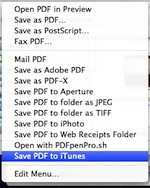
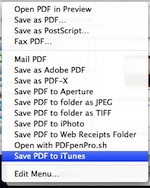
To see this in action, open any file you want to save in any program (even this browser window!), go to the File menu, and choose Print. In the lower left corner of the window there’s a PDF button. Click on it, and at the bottom of the list you now see “Save PDF to iTunes.” Choose it!

Now, open up your iTunes, and click on “Books” in the left bar. You’ll see your file on the list! When you sync your iPhone or iPad, go into the Books tab and make sure there’s a checkmark in front of the file. When you next go into iBooks on your device and tap PDF in its library, your file will be there!

Watch the demo on YouTube

Picture of Alicia Katz Pollock
Alicia Katz Pollock
Recently named one of America's Top 50 Women in Accounting, Alicia is a leading expert in QuickBooks Online training with a Masters in Teaching and decades of business consulting. She offers a range of tailored resources from self-paced courses to personalized coaching. Known for her patience and commitment, Alicia simplifies QuickBooks for clients, helping them achieve their financial management goals with ease.
Picture of Alicia Katz Pollock
Alicia Katz Pollock
Recently named one of America's Top 50 Women in Accounting, Alicia is a leading expert in QuickBooks Online training with a Masters in Teaching and decades of business consulting. She offers a range of tailored resources from self-paced courses to personalized coaching. Known for her patience and commitment, Alicia simplifies QuickBooks for clients, helping them achieve their financial management goals with ease.
Don't forget to share this post.
Related Articles
Episode 126 | The Canny Can-Can | Blog Header | Royalwise
QuickBooks
Alicia Katz Pollock
The Canny Can-Can (Podcast)

Podcast Episode Overview Alicia and Margie explore Intuit’s Canny boards at intuit.canny.io, a powerful but underutilized platform where accountants can submit specific, actionable feedback directly to QuickBooks product managers and developers. They break down how to use the three available boards (bank feeds, modern view reports, and payroll), explain the difference between productive feedback and unproductive complaining, and reveal how

Read More »
Episode 125 | 1099 Reasons to Love January | Blog Header | Royalwise
QuickBooks
Alicia Katz Pollock
1099 Reasons to Love January (Podcast)

Podcast Episode Overview Alicia breaks down everything accounting professionals need to know about filing 1099-NEC and 1099-MISC forms in QuickBooks Online for 2026. She covers who qualifies for a 1099, which payment methods require filing, how to use QBO’s Contractor Center and automated filing tools, and why the $600 threshold is finally changing to $2,000 in 2027. Alicia also shares

Read More »
QuickBooks
Payden Miller
Author’s new book receives a warm literary welcome.

Author’s new book receives a warm literary welcome. Readers’ Favorite announces the review of the Non-Fiction – Business/Finance book “QuickBooks Online Bootcamp” by Alicia Katz Pollock, currently available at http://www.amazon.com/gp/product/0989399265. Readers’ Favorite is one of the largest book review and award contest sites on the internet. They have earned the respect of renowned publishers like Random House, Simon & Schuster,

Read More »