Days
Hours
Minutes
Seconds

LIVE TRAINING

Intuit Accountant Suite

On December 31, 2026, QuickBooks Online Accountant will officially be discontinued and Intuit Accountant Suite will take its place. Join us for a hands-on tour of the new platform.

Save a Website Shortcut to Your iPad or iPhone Home Screen

Add a Shortcut to iPhone Home Screen

Table of Contents

Add a Website to iPad iPhone Home Screen

Are there web pages that you go to on a regular basis? When you’re on your iPhone or iPad, you usually open Safari, go to Bookmarks, and find the page on the list. Here’s a faster way!

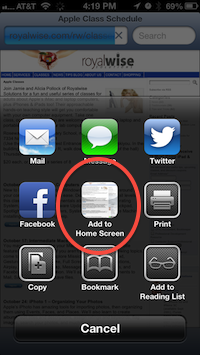
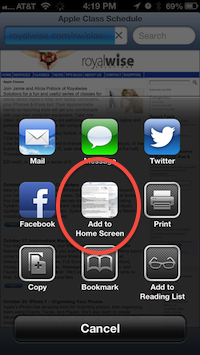
Go to the web page as normal. When there, tap the center bottom button with the square and the arrow called the “Share” button. In the slideup panel, tap on “Add to Home Screen.”

A default name will appear. You are welcome to edit it to something shorter.

After you press Done, you will now have a new icon on your Home Screen. One tap, and Safari will open right to that page!

Note that this icon is NOT an app, just a link.

If you love this tip and decide to make a collection of website links, I suggest making a  folder called “Bookmarks” and move all the links into the folder.

To make a folder, touch and hold on one of the new icons. Drag it onto another web link icon, then let go. The name will default to “Bookmarks” but you can change it.

Tap outside the folder to close it, then repeat the process until all the websites are inside.

When you’re done, press the Home button on the device so the icons stop shaking.

Now you have all your favorite web sites just a touch or two away!

Are you a visual learner? Watch our YouTube instructional video!

Picture of Alicia Katz Pollock
Alicia Katz Pollock
Recently named the 2026 Top ProAdvisor Educator by Insightful Accountant, Alicia is a nationally recognized QuickBooks Online expert with a Master’s in Teaching and decades of business consulting experience. Known for her patience, commitment, and approachable teaching style, she makes QuickBooks easier to understand for small business owners and accounting professionals alike, helping them build the skills they need to manage their finances with clarity and ease.
Picture of Alicia Katz Pollock
Alicia Katz Pollock
Recently named the 2026 Top ProAdvisor Educator by Insightful Accountant, Alicia is a nationally recognized QuickBooks Online expert with a Master’s in Teaching and decades of business consulting experience. Known for her patience, commitment, and approachable teaching style, she makes QuickBooks easier to understand for small business owners and accounting professionals alike, helping them build the skills they need to manage their finances with clarity and ease.
Don't forget to share this post.
Related Articles
Episode 149 | Now You Know: ITK June 2026 Recap | Royalwise
QuickBooks
Alicia Katz Pollock
Now You Know: ITK June 2026 Recap – Podcast

Podcast Episode Overview Alicia and Dan break down June’s In the Know session, starting with the big one: QuickBooks Online Accountant is being discontinued on December 31, 2026, with Intuit Accountant Suite taking its place. They cover the modern reports rollout timeline, new consolidation and elimination tools in Intuit Enterprise Suite, and the ProAdvisor program’s transformation into the tiered ProPartner

Read More »
Episode 148 | Intuit’s Q3 Earnings Report | Royalwise
QuickBooks
Alicia Katz Pollock
Intuit’s Q3 Earnings Report – Podcast

Podcast Episode Overview Intuit’s Q3 fiscal 2026 earnings call was packed with numbers, and with her co-hosts sitting this one out, Alicia goes through them one by one to explain what each actually signals for bookkeepers, accountants, and QuickBooks users. She breaks down the strength of QuickBooks Online and mid-market growth, the slowdown in Desktop and Mailchimp, AI already running

Read More »
Episode 147 | QBO Snooze You Lose! | Royalwise
QuickBooks
Alicia Katz Pollock
QBO Snooze You Lose! – Podcast

Podcast Episode Overview Alicia runs through the latest round of Intuit announcements, including invoice deposits, garnishment tracking in Payroll, batch bill pay for up to 50 payments at once, and a redesigned review-and-pay screen that now shows clients every open invoice. She also gets a little cynical about Intuit’s growing push to surface its own experts inside QuickBooks, where clients

Read More »