Safari Extension Gallery

Safari Extensions

Table of Contents

Safari ExtensionsAlmost unnoticed with all the hype about iPads, iPhones, and new iPods, are a few significant changes to the program you use every day to browse the internet, Safari.  Version 5 came out last month with little fanfare, but two new features caught my eye and I wanted to be sure you knew about them, too.

The first is that Safari now accepts extensions, just like Firefox. Extensions are little utilities that “extend” the features of the program, making your surfing experience that much easier, or more fun. Some add new functionality. Some are connections to other web services like Google, Twitter, or Facebook.

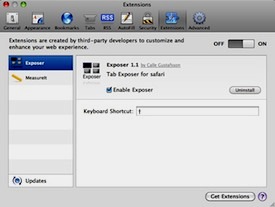
While most of these plug-ins may not be relevant to the way you use Safari, you’re likely to discover a few gems that you can’t live without. For example, I found one called “Exposer” that spreads out all the tabs I have open so I can view all the content and click on the one I need.

To find extensions for yourself, go up to the Safari menu in the upper left corner of your screen and click on “Safari Extensions Gallery.” A new webpage will open. Scroll down and read about all the new plug-ins.

When you find one you like, click the Install button, and it will be added to Safari. Then quit the program and open it again. You’ll find a new button, menu item, or bar that gives you the new functionality.

Now because this is new technology, I’d expect a few bugs. If the extension isn’t behaving as expected, or if you decide you don’t want it, go up to the Safari menu again and choose Preferences. At the top of the Preferences window, there’s a new button called “Extensions.” Click on it, and you’ll see a list of all the ones you have installed.

If you want to turn one off temporarily,  click on its name in the left column, then unclick the checkbox on the right side. If you want to remove it completely from your Safari, click the Uninstall button instead.

Picture of Alicia Katz Pollock
Alicia Katz Pollock
Recently named one of America's Top 50 Women in Accounting, Alicia is a leading expert in QuickBooks Online training with a Masters in Teaching and decades of business consulting. She offers a range of tailored resources from self-paced courses to personalized coaching. Known for her patience and commitment, Alicia simplifies QuickBooks for clients, helping them achieve their financial management goals with ease.
Picture of Alicia Katz Pollock
Alicia Katz Pollock
Recently named one of America's Top 50 Women in Accounting, Alicia is a leading expert in QuickBooks Online training with a Masters in Teaching and decades of business consulting. She offers a range of tailored resources from self-paced courses to personalized coaching. Known for her patience and commitment, Alicia simplifies QuickBooks for clients, helping them achieve their financial management goals with ease.
Don't forget to share this post.
Related Articles
QuickBooks Online Training Blog | Header Image | Royalwise
QuickBooks
Alicia Katz Pollock
The QuickBooks Online Training Revolution Has Begun

(Watch the video above to hear the full story straight about QuickBooks Online Training from Alicia Katz Pollock.) The accounting industry is undergoing a seismic shift. What used to be a solo bookkeeper’s job is now handled by entire departments inside CAS practices and tax firms. The pressure is on for staff at all levels to really know what they’re doing in

Read More »
QuickBooks Online Reports
QuickBooks
Alicia Katz Pollock
Unlocking the Power of QuickBooks Online Reports

Unlocking the Power of QuickBooks Online Reports: A Deep Dive for Bookkeepers and Business Owners Let’s face it, we all love those satisfying “cha-chings” as payments hit our bank accounts. But as bookkeepers and business owners, we know that the true story of our financial health lies deeper, within the reports nestled inside QuickBooks Online (QBO). It’s easy to get

Read More »
Year-end Cleanup in QuickBooks Online
QuickBooks
Payden Miller
Year-End Cleanup in QuickBooks Online: Your Guide to a Sparkling Clean Start!

Hey everyone, Alicia Katz Pollock here! As we gear up for tax season, I want to talk about one of my favorite topics: Year-end Cleanup in QuickBooks Online. Yes, I know, “cleanup” doesn’t usually spark joy, but trust me, a little QBO spring cleaning can make a world of difference for your peace of mind and, most importantly, for accurate

Read More »