Days
Hours
Minutes
Seconds

QuickBooks Online

Complete Hands-On Training

Learn QuickBooks Online in 12 weeks with our hands-on step-by-step guided course.

How to Record Credit Card Cash Rewards in QuickBooks

Recording Credit Card Rewards in QuickBooks

Table of Contents

I just got a new credit card that gives me cash back, a percentage of the money I spend. When I imported the refund transaction into QuickBooks, I was at a loss as to where to put the rebate. A little web research brought up two approaches for recording credit card cash rewards in QuickBooks.

1. Offset an Expense

For example, if you take a trip and spent a lot on airfare, you can apply the reward refund to that same travel expense category that you originally used for the transaction. You can even split the transaction into multiple expense accounts. The problem with this approach, though, is that at year-end you don’t have a true analysis of your expenses because it looks like you spent less than you did.

2. Create a New Other Income Account

Any cash back or statement credits you get on your credit cards go here. It classifies the refund as Income, but it still stays outside your Gross Receipts so it doesn’t impact your revenue analysis.
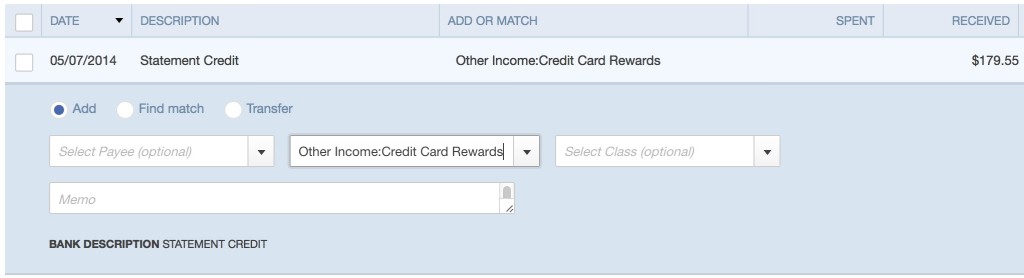
Credit Card Cash Rewards QuickBooks

Picture of Alicia Katz Pollock
Alicia Katz Pollock
Recently named one of America's Top 50 Women in Accounting, Alicia is a leading expert in QuickBooks Online training with a Masters in Teaching and decades of business consulting. She offers a range of tailored resources from self-paced courses to personalized coaching. Known for her patience and commitment, Alicia simplifies QuickBooks for clients, helping them achieve their financial management goals with ease.
Picture of Alicia Katz Pollock
Alicia Katz Pollock
Recently named one of America's Top 50 Women in Accounting, Alicia is a leading expert in QuickBooks Online training with a Masters in Teaching and decades of business consulting. She offers a range of tailored resources from self-paced courses to personalized coaching. Known for her patience and commitment, Alicia simplifies QuickBooks for clients, helping them achieve their financial management goals with ease.
Don't forget to share this post.
Related Articles
Episode 126 | The Canny Can-Can | Blog Header | Royalwise
QuickBooks
Alicia Katz Pollock
The Canny Can-Can (Podcast)

Podcast Episode Overview Alicia and Margie explore Intuit’s Canny boards at intuit.canny.io, a powerful but underutilized platform where accountants can submit specific, actionable feedback directly to QuickBooks product managers and developers. They break down how to use the three available boards (bank feeds, modern view reports, and payroll), explain the difference between productive feedback and unproductive complaining, and reveal how

Read More »
Episode 125 | 1099 Reasons to Love January | Blog Header | Royalwise
QuickBooks
Alicia Katz Pollock
1099 Reasons to Love January (Podcast)

Podcast Episode Overview Alicia breaks down everything accounting professionals need to know about filing 1099-NEC and 1099-MISC forms in QuickBooks Online for 2026. She covers who qualifies for a 1099, which payment methods require filing, how to use QBO’s Contractor Center and automated filing tools, and why the $600 threshold is finally changing to $2,000 in 2027. Alicia also shares

Read More »
QuickBooks
Payden Miller
Author’s new book receives a warm literary welcome.

Author’s new book receives a warm literary welcome. Readers’ Favorite announces the review of the Non-Fiction – Business/Finance book “QuickBooks Online Bootcamp” by Alicia Katz Pollock, currently available at http://www.amazon.com/gp/product/0989399265. Readers’ Favorite is one of the largest book review and award contest sites on the internet. They have earned the respect of renowned publishers like Random House, Simon & Schuster,

Read More »