Days
Hours
Minutes
Seconds

QuickBooks Online

Complete Hands-On Training

Learn QuickBooks Online in 12 weeks with our hands-on step-by-step guided course.

QuickBooks Payments and the New Deposits Tab

Table of Contents

QuickBooks Payments and the New Deposits Tab

Look what I found!

If you use QuickBooks Payments for your QuickBooks Online (QBO) merchant services, you’re in for a treat. Now there’s an easy way to monitor your QB Payments deposits, and access your Statements.

Deposits

When a deposit shows up in your Banking Feed, but you’re not sure exactly which transactions it was for…and for some reason it didn’t automatch*…you’ve always been able to go to http://merchantcenter.intuit.com to view your merchant services batches and see the transactions. But it was a drag to have to look in another website to get that info.

Now your QuickBooks Payments reports are at your fingertips, right in QBO!

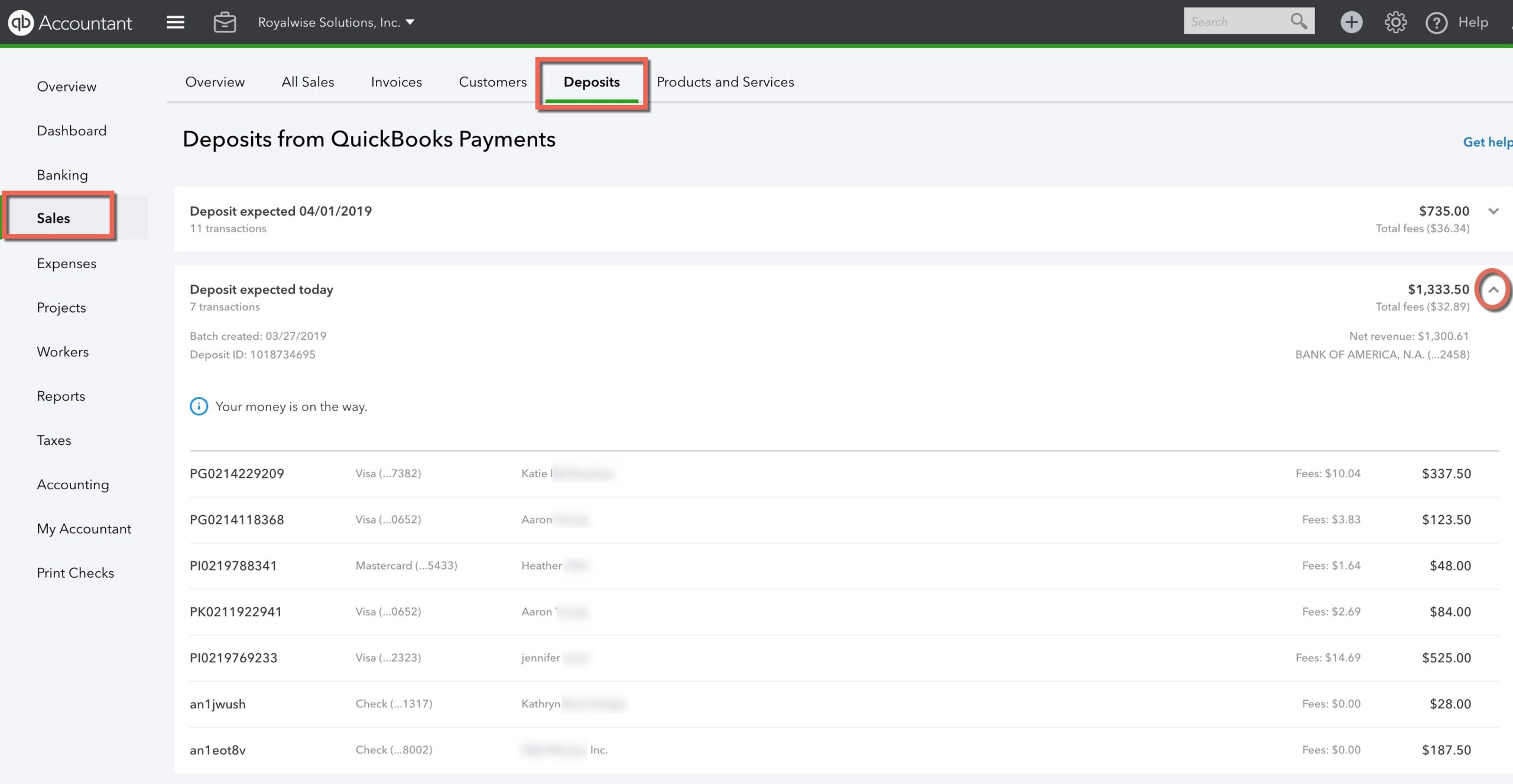
Click on Sales in the left navigation bar, then on Deposits. Here you’ll see each day’s credit card transactions, grouped by deposit date and total.

If the deposit happened in the past, click on the row to see the Payee names, dollar amounts, and fees.

If your deposit hasn’t hit the bank yet, you’ll see the estimated date when you can expect it!
If you haven’t already signed up for QB Payments, here’s another tip: if the business owner clicks the Learn More button from inside their Gear > Account and Settings > Payments tab, they will pay retail fee rates. If the bookkeeper clicks the button, they get discounted rates because QBO for Accountants recognizes their role as a ProAdvisor. Bookkeepers, be sure to do this for your clients!!

Even better, click here and go to my QuickBooks Payments registration link. As a member of Complete Business Group, an Intuit Reseller Program, my prices are even lower (and bookkeepers, sign up with Carrie Kahn and you too can offer this discount to your clients!).

As you can see, the transparency and convenience of QuickBooks Payments makes it the easy choice for merchant services for your company!

*Are your QuickBooks Payments not batching automatically? That happens when you take both swipe payments and receive email invoice payments, both in one day. When you view + > Bank Deposits, you can see your manual swipes up at the top, and the Invoice Payments show under the QuickBooks Payments section (you may have to click the dropdown arrow to see them). In this case, QBO can’t figure out the batch combination, and you have to check off the transactions from the top and bottom sections manually.

But at least you have the Deposits window to show you which transactions to combine!

Statements

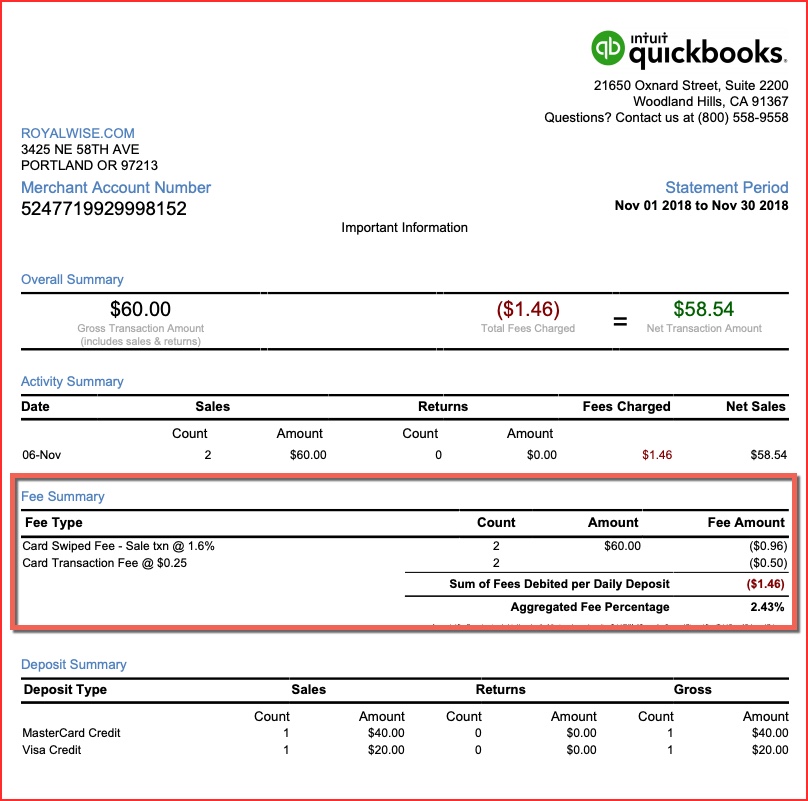
It’s also easy to see your monthly Statements. Click on Gear > Account and Settings > Payments. You can now see up to two years’ worth of monthly statements!

My favorite part is the Aggregated Fee Percentage. It averages all your different rates for swipes, invoices, and ACH, including fees, and gives you the true percentage of income. That gives you an apples-to-apples comparison to other merchant service solutions, like Square.
Picture of Alicia Katz Pollock
Alicia Katz Pollock
Recently named one of America's Top 50 Women in Accounting, Alicia is a leading expert in QuickBooks Online training with a Masters in Teaching and decades of business consulting. She offers a range of tailored resources from self-paced courses to personalized coaching. Known for her patience and commitment, Alicia simplifies QuickBooks for clients, helping them achieve their financial management goals with ease.
Picture of Alicia Katz Pollock
Alicia Katz Pollock
Recently named one of America's Top 50 Women in Accounting, Alicia is a leading expert in QuickBooks Online training with a Masters in Teaching and decades of business consulting. She offers a range of tailored resources from self-paced courses to personalized coaching. Known for her patience and commitment, Alicia simplifies QuickBooks for clients, helping them achieve their financial management goals with ease.
Don't forget to share this post.
Related Articles
Episode 124 | Now You Know; QuickBooks December 2025 Updates | Blog Header | Royalwise
QuickBooks
Alicia Katz Pollock
Now You Know; QuickBooks December 2025 Updates (Podcast)

Podcast Episode Overview Alicia breaks down Intuit’s December In the Know session, covering three major updates for accountants managing multiple clients and entities. She explains the new consolidated view and dynamic allocations in Intuit Enterprise Suite, walks through the Books Close beta feature that lets you work across client files from a single dashboard, and details the long-awaited realm consolidation

Read More »
Episode 123 | New Year, New Innovations! | Blog Header | Royalwise
QuickBooks
Alicia Katz Pollock
New Year, New Innovations! (Podcast)

Podcast Episode Overview Alicia and Dan kick off 2026 by diving into 27 pages of notes from Intuit Connect’s Innovation Circle. They break down upcoming changes to bank feeds (including confidence indicators and MasterCard receipt capture), the new payroll agent that handles timesheets via text message, enhanced tax impoundment processes, and Intuit Intelligence’s business analytics features. Most innovations are rolling

Read More »
Episode 122 | Christmas Gifts from Intuit!(Look What I Found Dec 2025) | Blog Header | Royalwise
QuickBooks
Alicia Katz Pollock
Christmas Gifts from Intuit! Look What I Found Dec 2025 (Podcast)

Podcast Episode Overview Alicia runs through the latest QuickBooks Online updates rolling out this holiday season, from enhanced client request routing in the banking feed to the completely redesigned sales tax center. She covers new time tracking integrations, the text-based payroll agent, modern report improvements, and explains why toggling that sales tax checkbox doesn’t actually change product taxability—a common source

Read More »