Using QuickBooks in a Convenience Store and Gas Station
Written by
Alicia Katz Pollock
Last Updated
Table of Contents
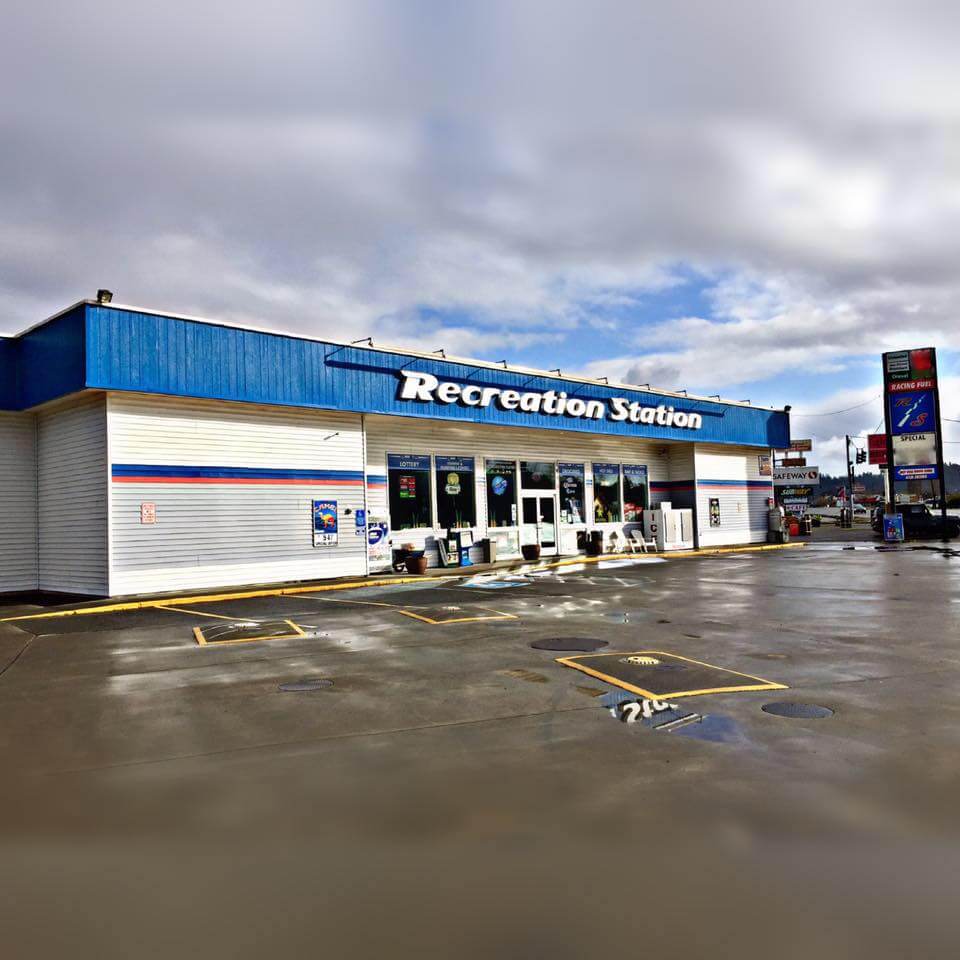
Recreation Station, Hwy 101, Reedsport OR
Back in 2017, I did a 50-hour project setting up QuickBooks Online for a convenience store and gas station in Reedsport, OR. The owner, Aaron Young, had bought the business on the side of Hwy 101 on the Oregon Coast, and needed to set up his books. We took the previous owner’s existing QB Desktop file and imported it into QBO. We cleaned up his structure and his numbers, reorganized the chart of accounts to reflect what he wanted to track, and customized Sales Receipts for steps he wanted his managers to do.
Resources:
I’ve created a Quickbooks Template for gas stations and convenience stores, and it comes with a manual as well. Get it here!
I also have a complete video course demonstrating all the steps to set up and use QuickBooks for gas stations and c-stores. Watch it come to life here!
Want all 3? Get the book, template, and videos for 15% off! Buy the bundle.
Sales Receipts for Daily Sales
I created Sales Receipts for Z-tapes at the end of the day instead of Journal Entries so that his shift managers could fill them in with their Customer and Sales-restricted User Account. To do this I created Products and Services that pointed to the income and expense areas of the Chart of Accounts. I customized a Recurring Daily Sale Receipt so that it was user-friendly for the managers, with instructions and explanations in the Descriptions.
A bonus to taking this approach is that Aaron could now run Product Sales Summary reports, and analyze how well each of his departments was doing.
Fuel Cost of Sales
His fuel costs were interesting. I discovered that the previous owner had been posting the state fuel tax into Inventory-Gas instead of COGS-Gas. After I Reclassified them, the Inventory-Gas account periodically ran negative through the month, which wasn’t right because they never ran out of gas in the tanks. To solve this, I had him find out as of 12/31 what the actual gallons were in the tanks on that day, and we researched the average price of December’s deliveries. That told us how much Fuel inventory he actually had. To correct it, I transferred the difference from COGS back into Inventory. Now his Inventory-Gas account was exact. His COGS-Gas account was more accurate than the last owner had. And the reclassification caused his income and profit to go up $100,000.
ATM
Recreation Station has an ATM in the store. Aaron wanted to make sure the money declared by the bank actually matched the amount the machine gave out. Money from the cash drawer was transferred into the ATM, dispensed, and then reimbursed by the bank. I made an ATM Clearing account to track the money in and out. By reconciling the account to zero every week, he could verify that he was getting his money back.
Wex Payments
I did the same for his Wex payments. Wex is a gas card that drivers use as payment, and then Wex reimburses the money a few months later. This clearing account reassured Aaron that he was getting paid back for the credit. We made a Product & Service in QBO to serve as a Payment Method in the daily sales Z-tape, which puts money in the clearing account, and when the money hits the bank it’s transferred out of the clearing account. But it’s a little difficult to reconcile. Sometimes the daily Wex payment matched the sales receipts, but on weekends, the company batched the three payments together.
We created a similar clearing system for the OR Lottery, using a weekly Journal Entry to distribute the income, payouts, and state contributions.
Gift Cards and Owner’s Comp
I also set up a Gift Card and Owner’s Comp system. For example, an employee accidentally broke the glass in a motorist’s mirror. Aaron comped the driver $75. I created a JE that moved the money from Discount/Refunds Given to a Gift Certicate Liability. Every time the Gift Certificate was was redeemed, the Daily Sales Receipt reduced his $75 in the Liability account until it was gone.
Cash Drawer
The owner paid some small bills out of the till. Local hummus, firewood, night crawlers, and linen laundry were all paid in cash. The previous owner’s system only reported that some cash was spent, but not for what. The new system pushed each product category to the proper COGS account.
Recurring Transactions Templates
As I created each data entry step, I saved the procedure’s form as a Recurring Transaction. I named them Daily:, Weekly:, and Monthly:, with the reason for the transaction as the name. This way he could see what tasks needed to be done with what frequency.
As an added bonus, I also duplicated each one and appended “Backup” to the name. Because many of the transactions require small alterations when used, QBO always asks if you want to save those changes to the Recurring Transaction template. If they accidentally clicked “Yes”, they would lose the system we set up. As a safeguard, if that mistake was made they could replace the bad template with the backup.
Delegate!
By crafting the gas station and convenience store’s transaction structure so that as many transactions as possible could be done by managers (by making them Sales Receipts instead of Journal entries), Aaron could delegate many of his daily tasks, saving him time every day.
Alicia has created not only a book that contains all the setup information you will need to create a QuickBooks file for your Convenience Store and Gas Station business—she has also created a ready-to-use Template! This pre-made QuickBooks Desktop file will save you the several hours it would have taken to create the file on your own. It is available for purchase here!
To use the template, you will need a copy of QuickBooks Desktop 2019 or higher. If you would like to use the template with QuickBooks Online (QBO), you will need a subscription to QuickBooks Online Essentials or Plus. In order to upload the ready-made file into QuickBooks Online, you will need a copy of QuickBooks Desktop for this one-time conversion. We suggest finding a trial copy, or asking a colleague who has QuickBooks Desktop to help you. Alicia can also provide this service.
Note that if you import the ready-made file into QuickBooks Online, you will need to recreate the Recurring Transactions and Custom reports by hand, as they do not import.
If you’re interested in learning more about how gas stations and convenience stores can successfully use QuickBooks Online to manage their daily and monthly bookkeeping, please call business owner Aaron Young of Recreation Station in Reedsport, OR at (541) 706-1198.
Recently named one of America's Top 50 Women in Accounting, Alicia is a leading expert in QuickBooks Online training with a Masters in Teaching and decades of business consulting. She offers a range of tailored resources from self-paced courses to personalized coaching.
Known for her patience and commitment, Alicia simplifies QuickBooks for clients, helping them achieve their financial management goals with ease.
Recently named one of America's Top 50 Women in Accounting, Alicia is a leading expert in QuickBooks Online training with a Masters in Teaching and decades of business consulting. She offers a range of tailored resources from self-paced courses to personalized coaching.
Known for her patience and commitment, Alicia simplifies QuickBooks for clients, helping them achieve their financial management goals with ease.
Podcast Episode Overview Sales tax in QuickBooks Online is powerful — it tracks rates, recognizes tax holidays, and even handles economic nexus — but one wrong checkbox or a hidden shipping field can throw everything off. Alicia Katz Pollock breaks down the full sales tax workflow from setup to payment, revealing the three settings that have to line up perfectly
Podcast Episode Overview Alicia and Dan wrap up their three-part tour through the Intuit Connect Innovation Circle, covering everything from Intuit Enterprise Suite’s construction-focused upgrades to MailChimp’s QuickBooks integration and enhanced bill pay workflows. They discuss AI-powered project management tools, approval workflows that go seven layers deep, and how Credit Karma is now offering lending services directly within QuickBooks—plus why
Podcast Episode Overview Alicia walks through her systematic approach to year-end cleanup, explaining why many business owners’ books contain errors that go unnoticed until tax time. She covers the most common trouble spots—from duplicate revenue in undeposited funds to improperly categorized transactions—and demonstrates how to use QuickBooks’ built-in tools like the Reclassify feature and Report Options to fix problems at