Days
Hours
Minutes
Seconds

LIVE TRAINING

Customizing QBO

Learn to customize your QuickBooks Online dashboard, navigation, invoices, and bank feeds.

QuickBooks Payments User Accounts in QBO

Payments-Only User Accounts

Table of Contents


Look What I Found!  QuickBooks Payments Merchant Services allows you to take payments when you’re out and about in the field. Do you provide onsite services, sell products at farmer’s markets, or take money at events? Not only can you swipe credit cards on the spot…now your staff can, too! Let’s take a look at Payments-Only User Accounts in QBO.

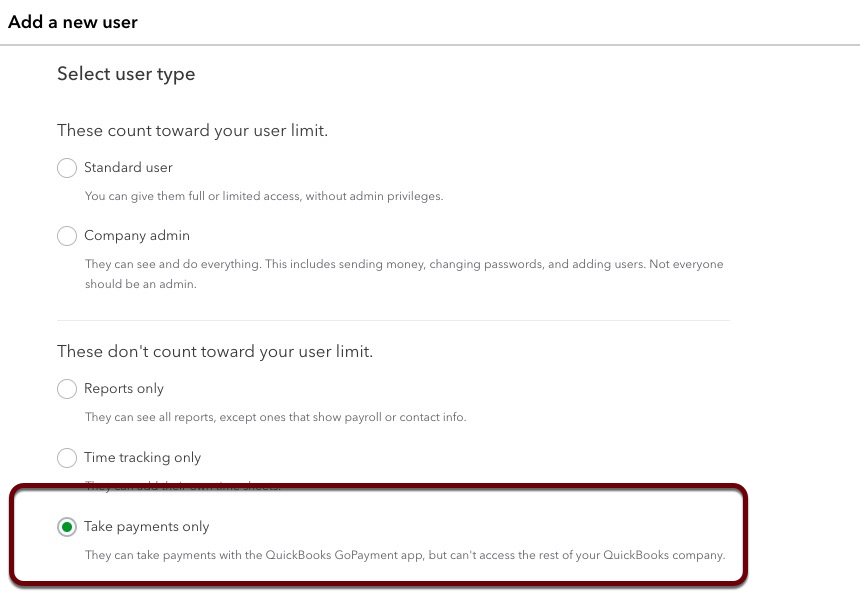
Go to Gear > Manage Users, and click Add user. Choose the user type “Take Payments Only.” These Payments-Only User Accounts do NOT count against your QBO subscription’s user limit!

They are, however, limited to using the GoPayment app on their phone, instead of the full QBO app. This app allows them to punch in a dollar amount and swipe a credit card. It has no ability to create Sales Receipts, or assign products & services. It isn’t as robust a regular user’s experience in the regular QBO app.

But for a quick-and-easy way for your staff to take payments on the fly, this new option solves a huge need for many businesses.

Be sure to check out my complete QBO Mobile App self-paced course here.

Picture of Alicia Katz Pollock
Alicia Katz Pollock
Recently named the 2026 Top ProAdvisor Educator by Insightful Accountant, Alicia is a nationally recognized QuickBooks Online expert with a Master’s in Teaching and decades of business consulting experience. Known for her patience, commitment, and approachable teaching style, she makes QuickBooks easier to understand for small business owners and accounting professionals alike, helping them build the skills they need to manage their finances with clarity and ease.
Picture of Alicia Katz Pollock
Alicia Katz Pollock
Recently named the 2026 Top ProAdvisor Educator by Insightful Accountant, Alicia is a nationally recognized QuickBooks Online expert with a Master’s in Teaching and decades of business consulting experience. Known for her patience, commitment, and approachable teaching style, she makes QuickBooks easier to understand for small business owners and accounting professionals alike, helping them build the skills they need to manage their finances with clarity and ease.
Don't forget to share this post.
Related Articles
Episode 149 | Now You Know: ITK June 2026 Recap | Royalwise
QuickBooks
Alicia Katz Pollock
Now You Know: ITK June 2026 Recap – Podcast

Podcast Episode Overview Alicia and Dan break down June’s In the Know session, starting with the big one: QuickBooks Online Accountant is being discontinued on December 31, 2026, with Intuit Accountant Suite taking its place. They cover the modern reports rollout timeline, new consolidation and elimination tools in Intuit Enterprise Suite, and the ProAdvisor program’s transformation into the tiered ProPartner

Read More »
Episode 148 | Intuit’s Q3 Earnings Report | Royalwise
QuickBooks
Alicia Katz Pollock
Intuit’s Q3 Earnings Report – Podcast

Podcast Episode Overview Intuit’s Q3 fiscal 2026 earnings call was packed with numbers, and with her co-hosts sitting this one out, Alicia goes through them one by one to explain what each actually signals for bookkeepers, accountants, and QuickBooks users. She breaks down the strength of QuickBooks Online and mid-market growth, the slowdown in Desktop and Mailchimp, AI already running

Read More »
Episode 147 | QBO Snooze You Lose! | Royalwise
QuickBooks
Alicia Katz Pollock
QBO Snooze You Lose! – Podcast

Podcast Episode Overview Alicia runs through the latest round of Intuit announcements, including invoice deposits, garnishment tracking in Payroll, batch bill pay for up to 50 payments at once, and a redesigned review-and-pay screen that now shows clients every open invoice. She also gets a little cynical about Intuit’s growing push to surface its own experts inside QuickBooks, where clients

Read More »