
Microsoft Clip Art Ultimate Guide: Editing, Changing, Drawing & More!

Microsoft clip art tutorial

Table of Contents

Editing Clip Art in Microsoft Word

Microsoft Clip Art Ultimate Guide: Editing, Changing, Drawing & More

Have you ever wanted to use Microsoft Clip Art in your document, but didn’t because it had the wrong colors, or an element you didn’t like? Like we teach in our popular Microsoft Word class, it’s actually possible to edit graphics found in the Clip Art Gallery. Note that this only works on drawings, not photographs, and not on all of them. Here’s how you do it:

Ungroup the Clip Art Graphic

On the right side of the PICTURE TOOLS > FORMAT Tab, click on the GROUP button, and then select UNGROUP. An alert box may appear that says, “This is an imported picture, not a group. Do you want to convert it to a Microsoft Office drawing object?” Click YES.

Occasionally, you need to Ungroup twice.

The image changes into a Drawing Canvas, with all the elements of the Clip Art broken up into tiny pieces. To see this in action, click once inside the frame, then press CTRL-A on the keyboard to SELECT ALL. You now see all the resizing handles for all of the graphic elements. Click outside the box—don’t change anything yet!
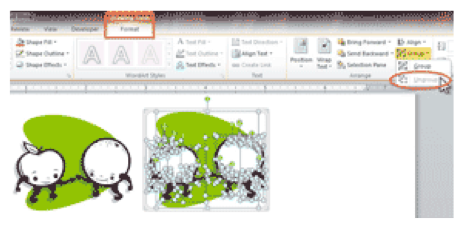
Ungrouping Graphics in Microsoft Word

Change Clip Art Colors

Find an element to recolor. Click on it (it may take several tries to find the right one if there are a lot of overlapping elements), and use the DRAWING TOOLS > SHAPE FILL to change the color.
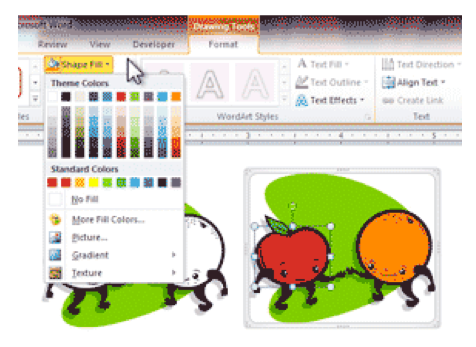
Changing Clip Art Colors in Microsoft Word

Delete and Add Microsoft Clip Art Elements

Click on any element to remove, and tap Delete on the keyboard.

To add an element, use INSERT SHAPES to create and position it in the Drawing Canvas.
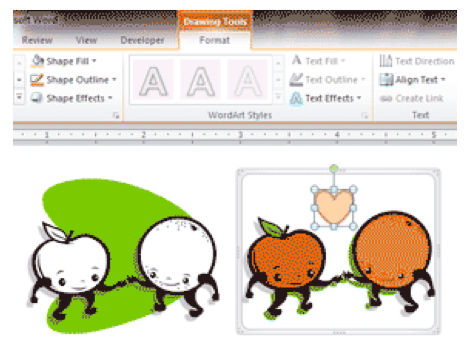
Delete and Add Elements

Regroup the Image

To finish, click anywhere inside the Drawing Canvas and SELECT ALL or CTRL-A again. On the DRAWING TOOLS ribbon, click on GROUP, and then on the GROUP option.
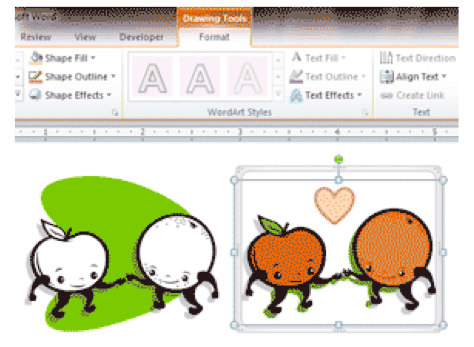
Regroup the Image

Join Our Microsoft Office Community for More Tips & Resources!

microsoft office training


Picture of Alicia Katz Pollock
Alicia Katz Pollock
Recently named one of America's Top 50 Women in Accounting, Alicia is a leading expert in QuickBooks Online training with a Masters in Teaching and decades of business consulting. She offers a range of tailored resources from self-paced courses to personalized coaching. Known for her patience and commitment, Alicia simplifies QuickBooks for clients, helping them achieve their financial management goals with ease.
Picture of Alicia Katz Pollock
Alicia Katz Pollock
Recently named one of America's Top 50 Women in Accounting, Alicia is a leading expert in QuickBooks Online training with a Masters in Teaching and decades of business consulting. She offers a range of tailored resources from self-paced courses to personalized coaching. Known for her patience and commitment, Alicia simplifies QuickBooks for clients, helping them achieve their financial management goals with ease.
Don't forget to share this post.
Related Articles
QuickBooks
Payden Miller
Author’s new book receives a warm literary welcome.

Author’s new book receives a warm literary welcome. Readers’ Favorite announces the review of the Non-Fiction – Business/Finance book “QuickBooks Online Bootcamp” by Alicia Katz Pollock, currently available at https://www.amazon.com/gp/product/0989399265. Readers’ Favorite is one of the largest book review and award contest sites on the internet. They have earned the respect of renowned publishers like Random House, Simon & Schuster,

Read More »
QBO Bootcamp Press Release | Blog Header Image | Royalwise
QuickBooks
Payden Miller
How QBO Bootcamp is Changing the Game for Small Business Owners

If you’ve ever felt overwhelmed by your business finances, you’re not alone. Managing books, keeping up with tax prep, and understanding accounting software can be daunting—especially for small business owners. But a new book by Alicia Katz Pollock, QBO Bootcamp: From Setup to Tax Time, is here to help—and it’s already receiving glowing praise. A 5-Star Guide That Makes Finance Manageable

Read More »
Two Accounting Apps | Blog Post Header Image | Royalwise
QuickBooks
Brandon Mateika
When Two Accounting Apps Listen to Their Customers (And Actually Do Something About It)

Picture this: It’s 2021 at ‘Appy Camp, and Ben Stein from Keeper is standing at a bar, drink ticket in hand, ready to exchange it for a well-deserved cocktail after a long day of conference sessions. But when Alicia Katz Pollock rushes past—bass guitar case slung over her shoulder, racing to join the evening’s music circle around the fire—and tosses him

Read More »