How to Right Click on a Mac

right-click

Table of Contents

how to right click on a macHow to Right Click on a Mac

If you moved over to a Mac from a PC, you’ve been wondering where it is…

And if you’ve always been on a Mac, you may not even know it exists…

Yes, my friend, your Mac does have a right click!

When you “right-click” on something, a list of context-sensitive commands pops up. For example, if I right-click on a file icon, I see options for 10 actions I can take, including opening it, moving it to the trash, or compressing it into a zip file.

By default this option is turned off so that people don’t get confused when they click their mouse and a list of commands pops up under their cursors. But personally, I couldn’t live without it.

Try this now…hold down the Control or Ctrl key in the lower left corner of your keyboard, and click almost anywhere on your screen. Violá! A shortcut list.

I find this particularly handy for throwing files in the trash. I hate having to drag, drag, drag, then slip and accidentally move the file to my desktop or some random location. Instead, I’ll Control-click on the file, and choose Move to Trash. Easy!

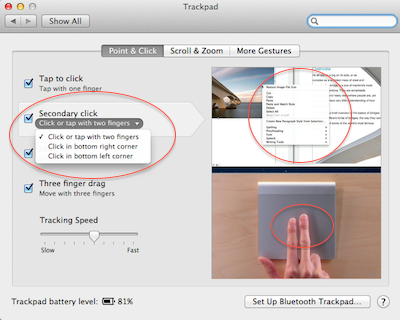
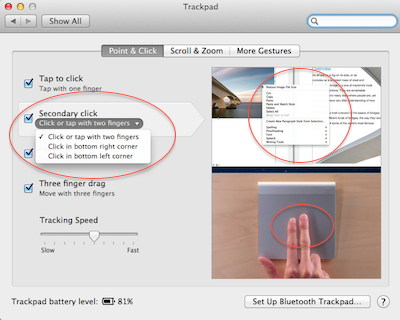
You can also set your mouse or trackpad to right-click as well. Open up your System Preferences, either from the gearbox in the dock, or on the Apple Menu in the top left corner. Then click on Mouse or Trackpad.

Here, a right-click is called a “secondary click”. Most people call it a right-click because that’s how it was done on older mice. But with Apple’s Magic Mouse or a trackpad there are no buttons, so they call it something else in the settings.

The actual location of the setting depends on what kind of mouse you have, or what operating system you’re running. But look for “Secondary click”, and turn it on.

You may even be able to choose what part of your input device triggers the effect. I prefer the bottom right corner of my trackpad or right side of my mouse, but there’s a new option for a 2-finger click that I’ve been getting used to. I think I like it!

If you found this helpful, you may enjoy learning about our Mac training courses!

If you are looking for Apple training, community, and access to all of our Mac training resources, click below to learn about our Mentorship Program!

Apple training


Picture of Alicia Katz Pollock
Alicia Katz Pollock
Recently named one of America's Top 50 Women in Accounting, Alicia is a leading expert in QuickBooks Online training with a Masters in Teaching and decades of business consulting. She offers a range of tailored resources from self-paced courses to personalized coaching. Known for her patience and commitment, Alicia simplifies QuickBooks for clients, helping them achieve their financial management goals with ease.
Picture of Alicia Katz Pollock
Alicia Katz Pollock
Recently named one of America's Top 50 Women in Accounting, Alicia is a leading expert in QuickBooks Online training with a Masters in Teaching and decades of business consulting. She offers a range of tailored resources from self-paced courses to personalized coaching. Known for her patience and commitment, Alicia simplifies QuickBooks for clients, helping them achieve their financial management goals with ease.
Don't forget to share this post.
Related Articles
QBOA for ProAdvisors
QuickBooks
Alicia Katz Pollock
Ditch the Desktop Drama: Unveiling the Hidden Gems of QBOA for ProAdvisors

Let’s face it, the recent news about QuickBooks Desktop phasing out has sent ripples of uncertainty through the bookkeeping and accounting world. But before you hit the panic button, let me assure you: millions of us have already embraced QuickBooks Online (QBO) – and for good reason. QBO isn’t just a web-based version of Desktop; it’s a whole new ball

Read More »
eCommerce
QuickBooks
Alicia Katz Pollock
Navigating the eCommerce Jungle: Integrating Your Online Sales with QuickBooks Online

Running an eCommerce business is exciting, but managing the financial side can feel like hacking your way through a dense jungle. Especially when it comes to integrating your eCommerce platforms with your accounting software, the options can be overwhelming. As a bookkeeper or small business owner, you need accurate, up-to-date financials, and that means getting your eCommerce sales data into

Read More »
QuickBooks Online Hacks
QuickBooks
Alicia Katz Pollock
QuickBooks Online Hacks

QuickBooks Online Hacks: Boost Your Efficiency with These Insider Tips Are you a QuickBooks Online user looking to streamline your workflow and save valuable time? This blog post is packed with insider tips and tricks, what I like to call “hacks,” to help you navigate QuickBooks Online more efficiently and effectively. Mastering the Interface: Hidden Tools and Shortcuts Let’s dive

Read More »