Days
Hours
Minutes
Seconds

LIVE TRAINING

Master AI in QuickBooks® Online

Learn what QuickBooks Online AI tools can do and start putting AI to work.

How to Right Click on a Mac

right-click

Table of Contents

how to right click on a macHow to Right Click on a Mac

If you moved over to a Mac from a PC, you’ve been wondering where it is…

And if you’ve always been on a Mac, you may not even know it exists…

Yes, my friend, your Mac does have a right click!

When you “right-click” on something, a list of context-sensitive commands pops up. For example, if I right-click on a file icon, I see options for 10 actions I can take, including opening it, moving it to the trash, or compressing it into a zip file.

By default this option is turned off so that people don’t get confused when they click their mouse and a list of commands pops up under their cursors. But personally, I couldn’t live without it.

Try this now…hold down the Control or Ctrl key in the lower left corner of your keyboard, and click almost anywhere on your screen. Violá! A shortcut list.

I find this particularly handy for throwing files in the trash. I hate having to drag, drag, drag, then slip and accidentally move the file to my desktop or some random location. Instead, I’ll Control-click on the file, and choose Move to Trash. Easy!

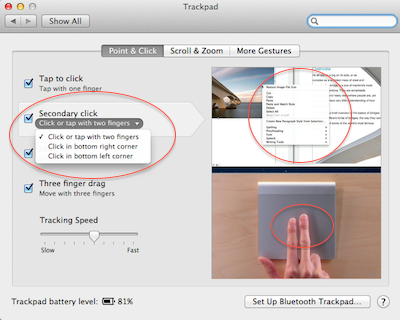
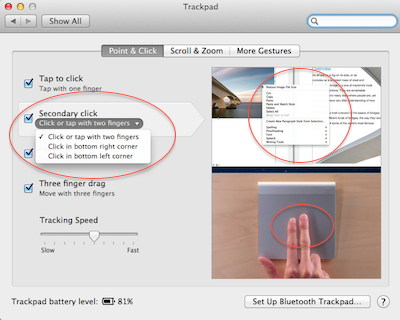
You can also set your mouse or trackpad to right-click as well. Open up your System Preferences, either from the gearbox in the dock, or on the Apple Menu in the top left corner. Then click on Mouse or Trackpad.

Here, a right-click is called a “secondary click”. Most people call it a right-click because that’s how it was done on older mice. But with Apple’s Magic Mouse or a trackpad there are no buttons, so they call it something else in the settings.

The actual location of the setting depends on what kind of mouse you have, or what operating system you’re running. But look for “Secondary click”, and turn it on.

You may even be able to choose what part of your input device triggers the effect. I prefer the bottom right corner of my trackpad or right side of my mouse, but there’s a new option for a 2-finger click that I’ve been getting used to. I think I like it!

If you found this helpful, you may enjoy learning about our Mac training courses!

If you are looking for Apple training, community, and access to all of our Mac training resources, click below to learn about our Mentorship Program!

Apple training


Picture of Alicia Katz Pollock
Alicia Katz Pollock
Recently named the 2026 Top ProAdvisor Educator by Insightful Accountant, Alicia is a nationally recognized QuickBooks Online expert with a Master’s in Teaching and decades of business consulting experience. Known for her patience, commitment, and approachable teaching style, she makes QuickBooks easier to understand for small business owners and accounting professionals alike, helping them build the skills they need to manage their finances with clarity and ease.
Picture of Alicia Katz Pollock
Alicia Katz Pollock
Recently named the 2026 Top ProAdvisor Educator by Insightful Accountant, Alicia is a nationally recognized QuickBooks Online expert with a Master’s in Teaching and decades of business consulting experience. Known for her patience, commitment, and approachable teaching style, she makes QuickBooks easier to understand for small business owners and accounting professionals alike, helping them build the skills they need to manage their finances with clarity and ease.
Don't forget to share this post.
Related Articles
Ignition’s Top 50 Women in Accounting 2026
News
Payden Miller
Alicia Katz Pollock Named One of Ignition’s Top 50 Women in Accounting 2026

Alicia Katz Pollock Named One of Ignition’s Top 50 Women in Accounting 2026 We have some exciting news to share from Royalwise: Alicia Katz Pollock has been named one of Ignition’s Top 50 Women in Accounting 2026! And if that sounds familiar, there’s a reason. Alicia was also named one of Ignition’s Top 50 Women in Accounting in 2023, making

Read More »
Episode 154 | QuickBooks Live is Dead, Long Live Intuit Experts | Royalwise
QuickBooks
Alicia Katz Pollock
QuickBooks Live is Dead, Long Live Intuit Experts – Podcast

Podcast Episode Overview QuickBooks Live is officially retired, and Alicia sits down with Dan DeLong and Matthew Fulton to unpack what replaces it: Intuit Experts, a narrower set of services built directly into QBO Simple Start and above. They walk through the new Books Check-In, Smart Expert Categorization, and Expert Books Upkeep offerings, how the accountant-attached toggle works, and why

Read More »
Episode 153 | Karla Uribe, Intuit’s Director of Product Management, IAS | Royalwise
QuickBooks
Alicia Katz Pollock
Karla Uribe, Intuit’s Director of Product Management, IAS – Podcast

Podcast Episode Overview Alicia sits down with Karla Uribe, Intuit’s Director of Product Management for the Accountant Segment, to unpack the vision behind Intuit Accountant Suite. They dig into the new Books Close and Client Insights features, how pricing and the ProPartner tiers will work, and what migrating from QBOA actually looks like in practice. Karla also addresses the AI

Read More »