Redundant Gmail Folders Taking Up Space
[box type=”alert” size=”large” border=”full”]UPDATE AS OF RELEASE OF OSX 10.9 MAVERICKS – Do not implement this fix if you are running OSX 10.9 Mavericks. It works fine in previous versions, but changes made in Apple Mail in 10.9 will cause lots of problems. Please read this post for an explanation.[/box]
PROBLEM: Multiple people are having problems with their hard drive space disappearing, and consequently their backups reaching capacity. One major culprit I have found is Gmail when you access it through Apple Mail.
Gmail uses a Labeling system which keeps all emails in a folder called “All Mail,” then labels them as “Inbox” or “Sent” or even “Trash.” You can see this folder in Apple Mail if you look down below the normal Mailboxes and Folders for a Mailbox called “Gmail.” Click the twisty arrow next to it and you can see the “All Mail” folder. This is a catch all folder and it syncs to your hard drive through IMAP, just like all the other folders you have on Gmail, but it doesn’t have to.
In the last two weeks I have seen “All Mail” folders with between 6,000 and 10,000 messages, even though the users kept their Inboxes completely clean. This massive folder slows down Apple Mail and your entire computer when it syncs with Gmail.
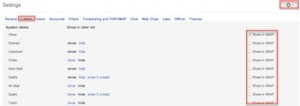
SOLUTION: Log into your Gmail account through gmail.com. Once you are in your Inbox, look for the Gear symbol dropdown on the top right. Click on it and select Settings. Once in the Settings area, click on the Labels tab. Here you will see a list of all the Labels that Gmail uses, and you can uncheck the ones you do not want to sync to your computer. So, in the “Use with IMAP” column, uncheck the ones you don’t need, including “All Mail”, “Important,” “Starred” or anything else you just are not utilizing. Once done, quit Apple Mail and then reopen it. It may take a few seconds for the “All Mail” folder to disappear. You can try clicking on it and it often refreshes. Poof, bye bye “All Mail” folder.
This will remove it from the bottom list in Apple Mail, and consequently from your hard drive, but not from your back up. To clean that up, you will need to go into your back up, then look inside your own Home folder, then in the Library>Mail folder. It may be another level or two down, but you will eventually find your Gmail’s IMAP folder and inside there all the folders (referred to as Mailboxes). Drill down far enough and you will find the “All Mail.mbox”. Delete it from your back-up and save yourself a ton of valuable hard drive space.
As always, if this sounds too complicated, just give Jamie or Alicia a call and we can come do it for you.
Gmail Account Compromised
PROBLEM: A client thought he had a virus because an email had been sent to everyone on his contact list selling some sort of Vitamin Supplement. He, of course, did not have a virus since there are no known viruses in the Apple universe. But his Yahoo! account had been hacked. This is unfortunately common with Yahoo! and AOL accounts. The account gets hacked, and the hacker sends some sort of marketing spam to that user’s entire contact list. This is one reason we recommend not storing your Contacts through your webmail on gmail or Yahoo!, and instead use Contacts on your computer with the free iCloud service from Apple.Well, last week I got one of these hacked account Spam messages from a friend’s Gmail account. I had never seen this happen with a Gmail account. Google is known for having good security, but I guess not as good as Apple’s iCloud service.
SOLUTION: Use a strong password and change it every once in a while. But what is a strong password? Here are the guidelines for a strong password:
- at least 8 characters
- at least one capital letter, one number and one symbol
- I like to use an eight letter word that I can remember then substitute some letters with numbers and symbol(s)
- Start with a Capital letter, since the iPhone and iPad capitalize the first letter for you.
Here is an example of how I would transform a known word to a strong password:
[highlight]Original word: snowball
Password: Sn0wba1![/highlight]
Be sure to write your password down somewhere, or use the excellent 1Password to store it securely on your computer.
We hope everyone is having a wonderful summer, and Happy Emailing!