Days
Hours
Minutes
Seconds

QuickBooks Online

Complete Hands-On Training

Learn QuickBooks Online in 12 weeks with our hands-on step-by-step guided course.

How to Create Placeholder Text in Word

Placeholder Text in Microsoft Word on a Mac

Table of Contents

If you’re creating a newsletter, flyer, or some other document, and the text hasn’t been written yet, insert placeholder text. This will allow you to work on the layout until the text is ready.

Here’s how you do it:

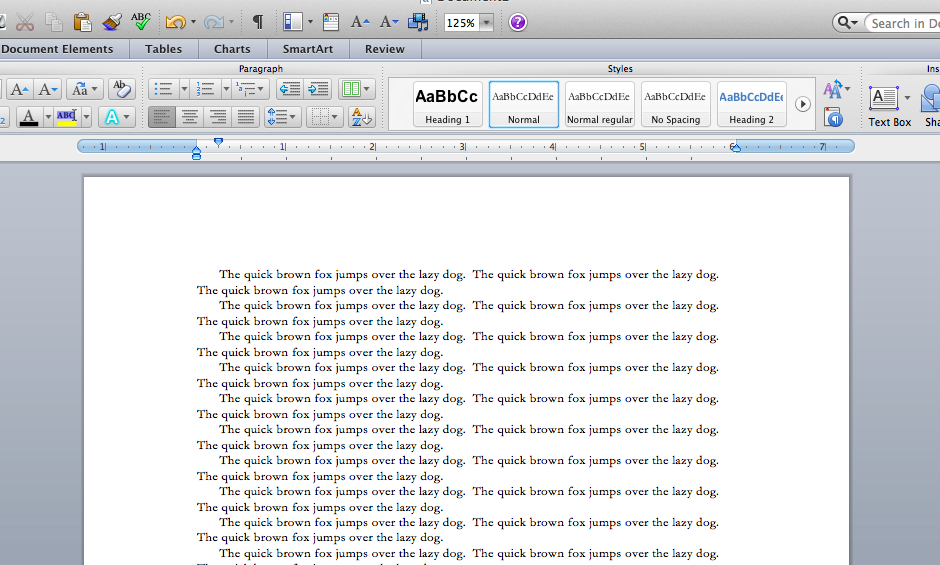
Type =Rand(#,#) where you want to add the placeholder text.

The first number is the number of paragraphs to create. The second is the number of sentences in each paragraph. So if I type =Rand(20,30) into a blank document, I get 20 paragraphs of 3 sentences each.

On a PC, the boilerplate text contains an explanation of Themes, Galleries, and Quick Styles. On a Mac, “The quick brown fox jumped over the lazy dog” repeats over and over again.
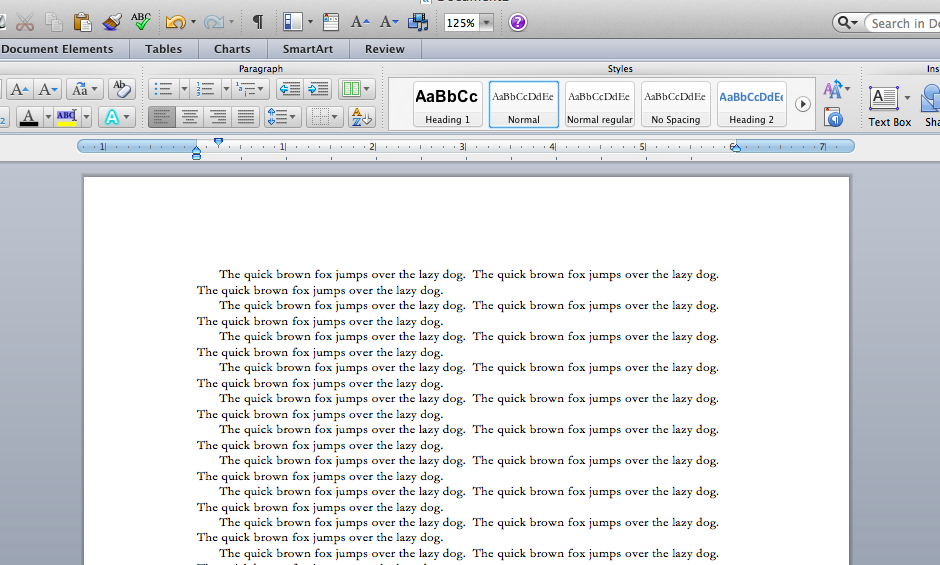
Placeholder Text in Microsoft Word on a Mac

Buy the Book

Microsoft Word 2010 Tips & TricksFor the complete collection of time-saving tips and tricks, buy my book, Microsoft Word 2010 Tips & Tricks. Available in eBook, iBook, Multi-touch, and paperback versions.



Picture of Alicia Katz Pollock
Alicia Katz Pollock
Recently named one of America's Top 50 Women in Accounting, Alicia is a leading expert in QuickBooks Online training with a Masters in Teaching and decades of business consulting. She offers a range of tailored resources from self-paced courses to personalized coaching. Known for her patience and commitment, Alicia simplifies QuickBooks for clients, helping them achieve their financial management goals with ease.
Picture of Alicia Katz Pollock
Alicia Katz Pollock
Recently named one of America's Top 50 Women in Accounting, Alicia is a leading expert in QuickBooks Online training with a Masters in Teaching and decades of business consulting. She offers a range of tailored resources from self-paced courses to personalized coaching. Known for her patience and commitment, Alicia simplifies QuickBooks for clients, helping them achieve their financial management goals with ease.
Don't forget to share this post.
Related Articles
Episode 129 | Sales Tax Less Taxing | Blog Header | Royalwise
QuickBooks
Alicia Katz Pollock
Deep Dive: Let’s Make Sales Tax Less Taxing (Podcast)

Podcast Episode Overview Sales tax in QuickBooks Online is powerful — it tracks rates, recognizes tax holidays, and even handles economic nexus — but one wrong checkbox or a hidden shipping field can throw everything off. Alicia Katz Pollock breaks down the full sales tax workflow from setup to payment, revealing the three settings that have to line up perfectly

Read More »
Episode 128 | Intuit Connect | Blog Header | Royalwise
QuickBooks
Alicia Katz Pollock
We’re Still at Intuit Connect! (Podcast)

Podcast Episode Overview Alicia and Dan wrap up their three-part tour through the Intuit Connect Innovation Circle, covering everything from Intuit Enterprise Suite’s construction-focused upgrades to MailChimp’s QuickBooks integration and enhanced bill pay workflows. They discuss AI-powered project management tools, approval workflows that go seven layers deep, and how Credit Karma is now offering lending services directly within QuickBooks—plus why

Read More »
Episode 127 | Year-End QBO Cleanup | Blog Header | Royalwise
QuickBooks
Alicia Katz Pollock
Year-End QBO Cleanup (Podcast)

Podcast Episode Overview Alicia walks through her systematic approach to year-end cleanup, explaining why many business owners’ books contain errors that go unnoticed until tax time. She covers the most common trouble spots—from duplicate revenue in undeposited funds to improperly categorized transactions—and demonstrates how to use QuickBooks’ built-in tools like the Reclassify feature and Report Options to fix problems at

Read More »