Take a look at the video below to see this system in action. If you would like help in setting this up, book a 90-minute appointment with me at http://royl.ws/schedule-with-Alicia. I’ll be happy to help.
Although Portland, Oregon has no Sales Tax, Service companies do need to track where they earned their money.
Multnomah County has two local taxes, a City of Portland Tax (which I’ll abbreviate as PDX Tax), and a separate tax rate for services performed in Multnomah County other than in Portland (MultCo Tax). This specifically applies to income received in Gresham, Fairview, and Troutdale.
If your company has a Portland address and all your work is done from your location, there’s nothing for you to worry about – your total revenue is the basis for your PDX tax. This also includes virtual work anywhere in the country, and e-commerce sales.
But if you travel to your clients’ location East of Portland, you have to pay a separate MultCo Tax. If the work is done West of Portland in Washington County, or to the South in Clackamas, that revenue is excluded from the City of Portland tax earnings base.
Typically, tracking revenue based on location has been such a headache that many companies don’t even bother. Sometimes it’s cheaper to just pay the extra tax than it is to manipulate spreadsheets to get the right numbers.
But I’m OCD, and I also like to use QuickBooks Online (QBO) in creative ways. I found a way to use QBO’s Sales Tax Center to track my job locations for me, and give me subtotals for each tax category, even though I’m paying $0 in actual Sales Taxes.
Note that this workaround only works with the “old” manual Sales Tax Center. If you have the new Automated Sales Tax system that calculates everything for you, it won’t even “do” Oregon since we don’t have Sales Tax. If your Sales Tax Center has blue bars and narrow rows, this will work. If it asks you for your address and has beautiful graphics, then you have the new one and it won’t work. You can call QBO support and have them change you to the legacy system. But if you do that, you will never be able to migrate back to the new Center. Since I’m in Oregon, that’s fine with me!
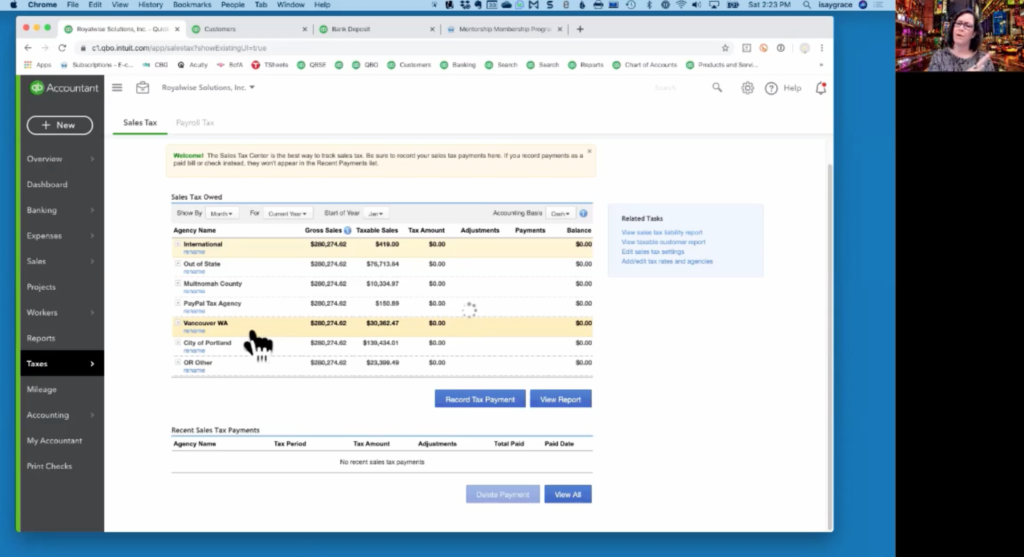
The trick is to create your own Sales Tax Agencies: one for City of Portland, one for Multnomah County (Gresham, Troutdale, Fairview), and one for Other. If it would be useful for you, you can also create additional categories including Oregon Other, Vancouver, Out of State, and International.
For all of them, enter the name of the location category for the Agency name. The tax rate for all is $0, because you’re not charging tax to any of your customers, and nor remitting sales tax to the state.
Once you have the 3+ tax categories created, the next step is to mark all of your services as Taxable. Go to Products & Services and Edit each one to turn on Taxable. Unfortunately, there’s no way to do this in bulk. If you have a long list, you could export the list, change the Tax Status in Excel, and then reimport it, being sure to overwrite the existing list. You also could use the 3rd party app CDATA to make the changes.
After your Services are all marked as “taxed,” the next step is to assign default tax rates to each of your Customers by editing their Details, and then clicking on their Tax tab. Choose the location associated with their zip code. This may get tricky because some Troutdale/Fairview folks still use “Portland” as their city, but their zip falls in the MultCo-not-PDX area.
If you don’t want to modify your entire Customer List, you can edit the tax code on the fly every time you make an Invoice or a Sales Receipt. Simply confirm that the Product/Service has a checkmark for Taxable, and that the Customer’s correct Tax Code is assigned.
To see how this plays out, click on Taxes>Sales Tax in the left navigation bar. In the top blue bar you can filter for specific timeframes. You’ll see all the regions you created, a repeated grand total for your total sales during the period, and a subtotal for how much of your income came from each location!
You can now use these subtotals as your City of Portland tax basis, and your Multnomah County tax basis. The other designations help you determine which regions are responsible for your revenue, which is helpful information to grow your business.
As an added bonus, I’ve attached a zip code list to the resources for this video, to help you identify Multnomah County-not-Portland.