Days
Hours
Minutes
Seconds

LIVE TRAINING

Master AI in QuickBooks® Online

Learn what QuickBooks Online AI tools can do and start putting AI to work.

Do you have drafts left in your folder, even after sending?

IMAP Drafts

Table of Contents

IMAP DraftsSometimes I work on a message in Apple Mail, and temporarily save it to my Drafts folder. When I open it again, finish it, then send it, occasionally it stays in my Drafts even though I can see that it was Sent. I can manually delete it, but there’s got to be a better way.

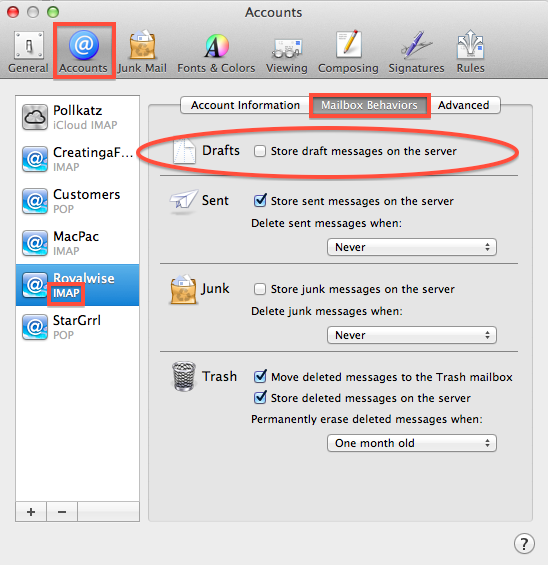
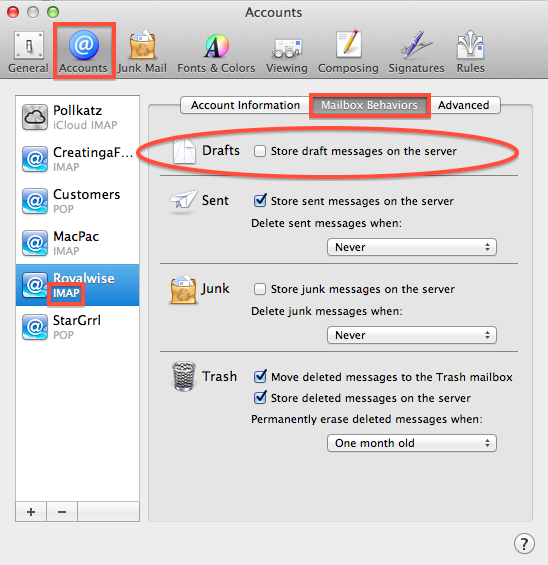
Go to the Mail menu and choose Preferences. Click on the Accounts button at the top. Click on the email account that has the issue. In the right pane, click on the Mailbox Behaviors tab.

Is there a checkmark in front of “Store Drafts messages on the server”? If so, uncheck it. From then on, drafts will only be saved on your computer, and not on your iPhone or iPad…but they won’t get stuck in your Drafts folder anymore!

Repeat this step for all other IMAP accounts you may have.

(Note that this option has been removed as of OS 10.12 Sierra).

Picture of Alicia Katz Pollock
Alicia Katz Pollock
Recently named the 2026 Top ProAdvisor Educator by Insightful Accountant, Alicia is a nationally recognized QuickBooks Online expert with a Master’s in Teaching and decades of business consulting experience. Known for her patience, commitment, and approachable teaching style, she makes QuickBooks easier to understand for small business owners and accounting professionals alike, helping them build the skills they need to manage their finances with clarity and ease.
Picture of Alicia Katz Pollock
Alicia Katz Pollock
Recently named the 2026 Top ProAdvisor Educator by Insightful Accountant, Alicia is a nationally recognized QuickBooks Online expert with a Master’s in Teaching and decades of business consulting experience. Known for her patience, commitment, and approachable teaching style, she makes QuickBooks easier to understand for small business owners and accounting professionals alike, helping them build the skills they need to manage their finances with clarity and ease.
Don't forget to share this post.
Related Articles
Ignition’s Top 50 Women in Accounting 2026
News
Payden Miller
Alicia Katz Pollock Named One of Ignition’s Top 50 Women in Accounting 2026

Alicia Katz Pollock Named One of Ignition’s Top 50 Women in Accounting 2026 We have some exciting news to share from Royalwise: Alicia Katz Pollock has been named one of Ignition’s Top 50 Women in Accounting 2026! And if that sounds familiar, there’s a reason. Alicia was also named one of Ignition’s Top 50 Women in Accounting in 2023, making

Read More »
Episode 154 | QuickBooks Live is Dead, Long Live Intuit Experts | Royalwise
QuickBooks
Alicia Katz Pollock
QuickBooks Live is Dead, Long Live Intuit Experts – Podcast

Podcast Episode Overview QuickBooks Live is officially retired, and Alicia sits down with Dan DeLong and Matthew Fulton to unpack what replaces it: Intuit Experts, a narrower set of services built directly into QBO Simple Start and above. They walk through the new Books Check-In, Smart Expert Categorization, and Expert Books Upkeep offerings, how the accountant-attached toggle works, and why

Read More »
Episode 153 | Karla Uribe, Intuit’s Director of Product Management, IAS | Royalwise
QuickBooks
Alicia Katz Pollock
Karla Uribe, Intuit’s Director of Product Management, IAS – Podcast

Podcast Episode Overview Alicia sits down with Karla Uribe, Intuit’s Director of Product Management for the Accountant Segment, to unpack the vision behind Intuit Accountant Suite. They dig into the new Books Close and Client Insights features, how pricing and the ProPartner tiers will work, and what migrating from QBOA actually looks like in practice. Karla also addresses the AI

Read More »