 Ever wonder why you are using so much server space on Gmail? Or why your Gmail syncing is so slow on all of your Apple devices? When you delete a message, do you wonder if it’s really gone? Maybe so, maybe not.
Your Gmail account has a catch-all area called “All Mail”. This is where all of your messages are stored. If a message is to be found in a different location, such as the Inbox or the Sent folder, then the message is tagged with a data label such as Inbox, or Sent, or Trash.
When you go to your Inbox, what’s actually happening is that the All Mail area is being filtered by the label “Inbox,” and you only see messages tagged as “Inbox”. When you delete a message from your Inbox, the “Inbox” label is replaced with a “Trash” label. And hypothetically, when you empty the Trash, then the message is actually deleted from your “All Mail” folder… maybe so, maybe not.
Basically, Gmail tags messages with labels so they can be filtered by the view you choose. In the Gmail web interface, folders are referred to as Labels and behave similarly to what we call Smart Mailboxes in Apple Mail. If you create a new Mailbox in Apple Mail, Gmail creates a label and filters the All Mail area by that label/folder/mailbox name.
When using the Gmail web interface, to delete a “folder” (referred to as a Mailbox in Apple Mail), the actual command is “Delete Label.” This removes the label/tag from all messages and deletes Mail’s “Smart Mailbox” that filters by that label, but it leaves the messages themselves in the All Mail folder with no labels attached to them…now forever lost in the abyss of the All Mail folder.
Gmail is the only email service that leverages this unique “labeling” system. And historically, third party Mail applications such as Apple Mail, Microsoft Outlook or even Eudora have had a huge challenge in how to handle mail both the normal way, and the Gmail way.
Since few people understand how it works, it’s no surprise that Apple has had a hard time figuring out how to make Apple Mail leverage IMAP to interpret Gmail’s “Labels”. The complexity of Gmail’s labeling system has made it impossible for any third party mail application to “do it right” over time.
I created my own Gmail account to test this, and it seems that Apple Mail currently handles all of this label manipulation correctly. But I have a strong suspicion that it hasn’t always been handled correctly in the past when POP was the standard email protocol. I have seen a lot of Gmail users who keep their Inbox cleared, but have in excess of 8 to 10 thousand messages in their All Mail area.
Here is an image of an extreme example. This client’s Inbox has 6 messages in it, but her All Mail folder has 108,640 messages in it. And she thought she had deleted all of those messages over time!
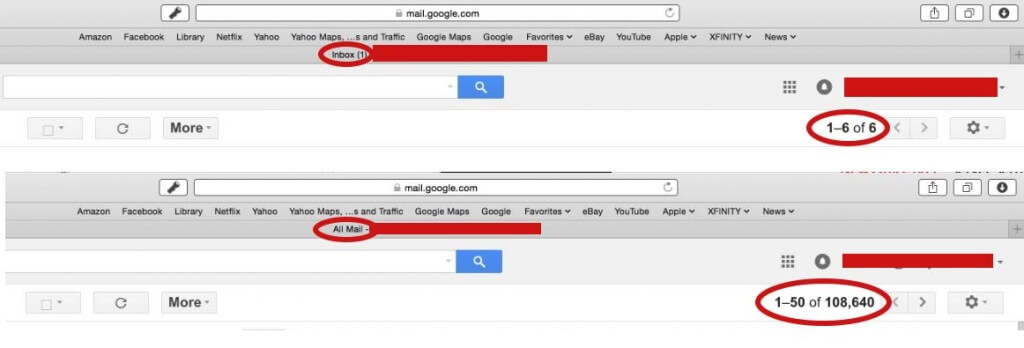
Is this a big deal? Does it even matter that there is more digital junk floating around in our All Mail folder? Actually, YES. You have probably never noticed, but your All Mail folder may be syncing onto all of your multiple devices, including your iPhone and iPad. A single email message is pretty small. About.com says they are, on average, 75 kilobytes**. Let’s do the math: 108,640 messages * 75 kb = 8,148,000 kb = 8.1 gigabytes. She had no idea that her computer, her iPhone, and iPad were syncing and storing over 8 GB of email messages that she believed she had already deleted.
Once there are thousands of unlabeled messages in the All Mail folder, it is very challenging to clean them up. Here is a support article from Google explaining how to do Advanced Searching using their labeling system: https://support.google.com/mail/answer/7190?hl=en.
This allows you to filter the All Mail mailbox yourself using simple searches such as in:inbox, in:trash, in:spam to find things in these areas. You can use has:userlabels, has:nouserlabels to find things that do not have user defined labels applied (meaning, they are not in a folder or Mailbox somewhere).
So…WHY? Why would Google do things so differently than everyone else. It actually makes sense for Google, since labeling and relabeling eliminates the need to physically “move” messages from mailbox to mailbox, essentially saving Google quite a bit in processing time and resources.
But be aware, Google has built an empire on data mining. Every search, every email, every everything that flows through their “Free Services” such as Gmail or Google Search is carefully tracked. The statistics are compiled and sold to other companies so they know how you think and behave online. It is in their best interest that you don’t throw any emails away. They want to know what you get, what you delete, what you click on, etc.. For them it is no big deal, since they have tons of storage space. But for iPhone users that only have 16 GBs of precious space on their device, it is a huge problem.
Now, goto your Gmail account on the google.com website and compare number of emails in your Inbox and the number of emails in your All Mail folder. If the difference is surprising or not what you expected, leave me a comment with the numbers so we can compare. And as always, get in touch if you need help fixing it!
**http://email.about.com/od/emailstatistics/f/What_is_the_Average_Size_of_an_Email_Message.htm