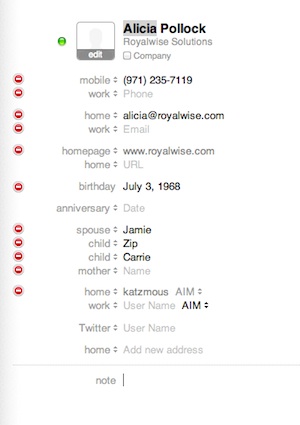
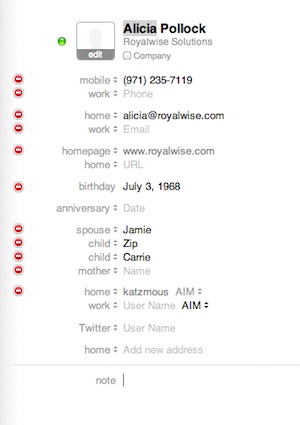
 No one wants to forget Mom’s birthday, when your kids were born, or your anniversary! You can store these dates in Address Book right alongside their phone numbers and email addresses. Then, you can make all the dates appear in your iCal automatically!
The trick is that the Date fields aren’t set up by default in Address Book. To start using them, click on the Address Book menu, and then choose Preferences.
Click on the third button for Templates.
Use the Add Field drop-down list to select Birthday. Go back up again, if you’d like, and also choose Dates.
While you’re there, look around at the other field options. You’re welcome to turn on any that you would find useful! You may want to add Profile to keep track of Twitter & Facebook accounts, and I REALLY like Related Names so that I can remember my coworkers’ wives’ names.
You can also turn off any fields that you never use!
When you’re done, close the Preferences window. Now, go to your own card in the Address Book. Click the Edit button at the bottom of the window. All your options appear.
Type in your birthday. If you’re running OSX 10.6 or earlier, you do need to enter something in the year even if you don’t know the year someone was born – I’ll generally use something like 2000 so that it’s obvious that’s not their real year. If you’re running OSX 10.7, you can leave the year blank if you don’t know how old someone is.
Do note that all the labels have choices. If I click on the Related Person field, I can alternatively select spouse, mother, child, assistant, or anyone else associated with that person. As soon as I enter in one person, a second entry appears in case I need it.
When I’m done entering all my info, click Done.
Now, let’s open up iCal and show the dates in the calendar. Click on the iCal menu, and then choose Preferences. On the General tab, there’s a checkbox for Show Birthdays Calendar. Now, my birthday appears on the calendar year after year!
You may ask why not put the birthdates right into iCal. Other features on your Mac also look for the Birthday field. If I use iPhoto to make a calendar, I’m given the option of including birthdays! In addition, other 3rd party software will also pull in your Birthday and Anniversary fields if they’re active.
Thanks, Apple, for attaching birthdays to my Contacts!