Days
Hours
Minutes
Seconds

QuickBooks Online

Complete Hands-On Training

Learn QuickBooks Online in 12 weeks with our hands-on step-by-step guided course.

Reset Your Administrative Password with your Apple ID

Reset Admin Password with Apple ID

Table of Contents

Reset password with Apple IDA few years ago, I was helping a client upgrade her Mac running OSX 10.5 Leopard, but she couldn’t remember her administrative password. Because she had an older computer, I couldn’t boot into OSX’s Recovery Disk and reset it from there – I had to go so far as to create a new Root User account and administer her account from there.

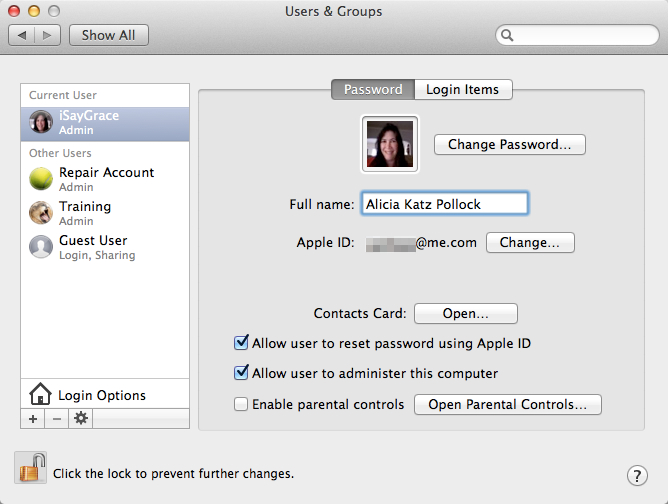
A few weeks ago, I was working on the same issue for a senior citizen and was overjoyed to make use of a feature introduced in OSX 10.7 Lion: Allow User to Reset Password Using Apple ID.

When you attempt to reset an administrative password, it asks for that current password. If you’ve forgotten it, which may be why you wanted to reset it in the first place, this is no help at all. With this new option, after your third attempt, you will be given an opportunity to log in using your Apple ID and password in order to make the change.

The good news is that if you’ve also forgotten your Apple ID password, you can reset that at http://iforgot.apple.com.

If you have an aging parent using a Mac, this new option may become quite handy.

Picture of Alicia Katz Pollock
Alicia Katz Pollock
Recently named one of America's Top 50 Women in Accounting, Alicia is a leading expert in QuickBooks Online training with a Masters in Teaching and decades of business consulting. She offers a range of tailored resources from self-paced courses to personalized coaching. Known for her patience and commitment, Alicia simplifies QuickBooks for clients, helping them achieve their financial management goals with ease.
Picture of Alicia Katz Pollock
Alicia Katz Pollock
Recently named one of America's Top 50 Women in Accounting, Alicia is a leading expert in QuickBooks Online training with a Masters in Teaching and decades of business consulting. She offers a range of tailored resources from self-paced courses to personalized coaching. Known for her patience and commitment, Alicia simplifies QuickBooks for clients, helping them achieve their financial management goals with ease.
Don't forget to share this post.
Related Articles
Episode 132 | Keep Changing My Software | Blog Header | Royalwise
QuickBooks
Alicia Katz Pollock
Keep Changing My Software! (Wheel of Rants) – Podcast

Podcast Episode Overview Alicia and Dan spin the Wheel of Rants and land on a topic that hits close to home: constant software changes. From QuickBooks’ modern reports rollout to Microsoft quietly burying features inside Copilot, they unpack why unexpected changes feel so disorienting, even when the updates are improvements. The conversation broadens into AI’s growing impact on the entire

Read More »
Episode 131 | QuickBooks February 2026 Release | Blog Header | Royalwise
QuickBooks
Alicia Katz Pollock
QuickBooks February 2026 Releases (Podcast)

Podcast Episode Overview Alicia recaps Intuit’s February ProAdvisor In the Know webinar, covering a packed slate of product updates across QuickBooks Online, Intuit Enterprise Suite, and the newly renamed Intuit Accountant Suite. Highlights include a new Affirm Buy Now Pay Later option appearing on invoices, major bank feed customization improvements, an AI-powered deduction maximizer for business owners, and new construction-specific

Read More »
Episode 130 | Intuit Accountant Suite | Blog Header | Royalwise
QuickBooks
Alicia Katz Pollock
Intuit Accountant Suite: Accelerate & Books Close – Deep Dive (Podcast)

Podcast Episode Overview Intuit moved up the pricing deadline for Accountant Suite add-ons to May 1st, which means less time to evaluate whether Books Close and the Accelerate dashboard are worth paying for. Dan DeLong walks Alicia through a live demo of Books Close — including reconciliation from outside the client file, transaction anomaly detection, W-9/1099 management, and the team

Read More »