Days
Hours
Minutes
Seconds

QuickBooks Online

Complete Hands-On Training

Learn QuickBooks Online in 12 weeks with our hands-on step-by-step guided course.

iPad & iPhone Keyboard Shortcuts

iOS Keyboard Shortcuts

Table of Contents

iOS Keyboard ShortcutsWhen you type on your iPhone, iPad, or iPod Touch, I’m sure you type some of the same things over and over. Instead, create Keyboard Shortcuts so that you can type in abbreviations that get autocorrected automatically!

Go into your Settings, and then into the General group. Tap on Keyboard at the bottom of the list. At the bottom of that screen you’ll see a list of Shortcuts.

One comes built-in: “omw” will autocorrect into “On my way!”

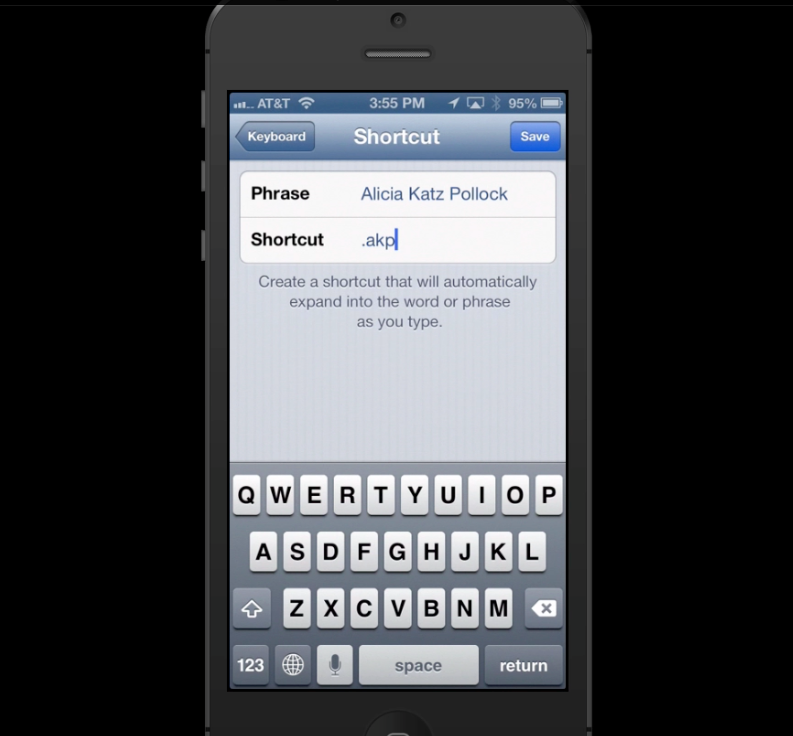
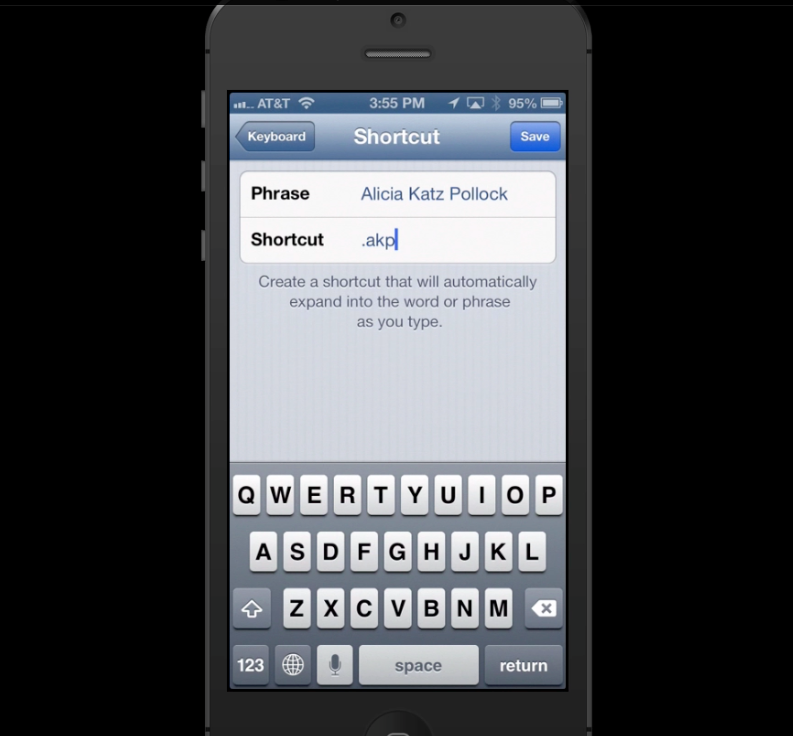
Tap on Add New Shortcut. Type in the phrase that you want your device to fill in for you. Add the initials or abbreviation to the Shortcut line.

Be sure to use a combination of letters that you wouldn’t type under normal circumstances. If necessary, start with a . or other punctuation mark to distinguish it from regular typing. For example, instead of using just my initials, which I may type into a document, I would use .akp as my Shortcut.

The next time you’re sending an email or text message, typing this combination of characters will cause your iPhone or iPad’s autocorrect to substitute your frequently-used phrase!


Watch our YouTube video to see this technique in action!

Picture of Alicia Katz Pollock
Alicia Katz Pollock
Recently named one of America's Top 50 Women in Accounting, Alicia is a leading expert in QuickBooks Online training with a Masters in Teaching and decades of business consulting. She offers a range of tailored resources from self-paced courses to personalized coaching. Known for her patience and commitment, Alicia simplifies QuickBooks for clients, helping them achieve their financial management goals with ease.
Picture of Alicia Katz Pollock
Alicia Katz Pollock
Recently named one of America's Top 50 Women in Accounting, Alicia is a leading expert in QuickBooks Online training with a Masters in Teaching and decades of business consulting. She offers a range of tailored resources from self-paced courses to personalized coaching. Known for her patience and commitment, Alicia simplifies QuickBooks for clients, helping them achieve their financial management goals with ease.
Don't forget to share this post.
Related Articles
Episode 132 | Keep Changing My Software | Blog Header | Royalwise
QuickBooks
Alicia Katz Pollock
Keep Changing My Software! (Wheel of Rants) – Podcast

Podcast Episode Overview Alicia and Dan spin the Wheel of Rants and land on a topic that hits close to home: constant software changes. From QuickBooks’ modern reports rollout to Microsoft quietly burying features inside Copilot, they unpack why unexpected changes feel so disorienting, even when the updates are improvements. The conversation broadens into AI’s growing impact on the entire

Read More »
Episode 131 | QuickBooks February 2026 Release | Blog Header | Royalwise
QuickBooks
Alicia Katz Pollock
QuickBooks February 2026 Releases (Podcast)

Podcast Episode Overview Alicia recaps Intuit’s February ProAdvisor In the Know webinar, covering a packed slate of product updates across QuickBooks Online, Intuit Enterprise Suite, and the newly renamed Intuit Accountant Suite. Highlights include a new Affirm Buy Now Pay Later option appearing on invoices, major bank feed customization improvements, an AI-powered deduction maximizer for business owners, and new construction-specific

Read More »
Episode 130 | Intuit Accountant Suite | Blog Header | Royalwise
QuickBooks
Alicia Katz Pollock
Intuit Accountant Suite: Accelerate & Books Close – Deep Dive (Podcast)

Podcast Episode Overview Intuit moved up the pricing deadline for Accountant Suite add-ons to May 1st, which means less time to evaluate whether Books Close and the Accelerate dashboard are worth paying for. Dan DeLong walks Alicia through a live demo of Books Close — including reconciliation from outside the client file, transaction anomaly detection, W-9/1099 management, and the team

Read More »