Convert Word to Powerpoint (Without Smashing Your Computer)

convert microsoft word to powerpoint

Table of Contents

Convert Word to Powerpoint: Getting Started

If your Word document has been properly formatted using Heading 1, Heading 2, and Heading 3 styles, or you’ve been making good use of the Outline View, you can use your file to create an instant PowerPoint presentation. There’s no need to retype it into PowerPoint, or to copy and paste all the content!

Here’s how you do it:

Use Heading Styles or Outline View


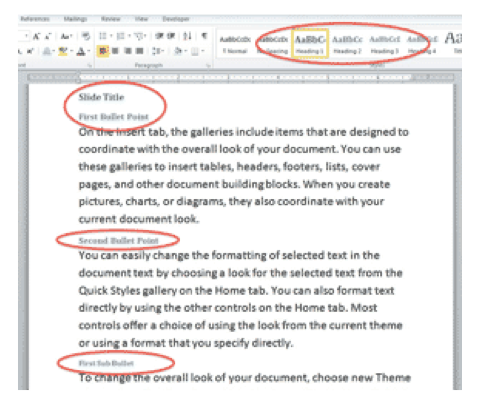
Set up your Word document so that the content that will become a SLIDE TITLE is formatted with the Heading 1 Style.

Make the BULLETS Heading 2 Style.

Make SUB-BULLETS Heading 3, 4, and 5 Styles.

Any other “body text” content not in these three styles will be ignored in the PowerPoint conversion.

Look at the document using OUTLINE VIEW, and see + signs to the left of text indicating that it will appear in the slideshow. BODY TEXT with a Circle in front of it will be ignored.

Delete any EXTRA BLANK LINES that are formatted as Headings, or they will become slides!
convert word to powerpointImport Microsoft Powerpoint Slides From Word Outline


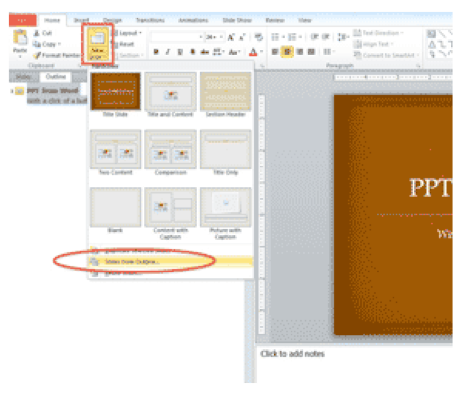
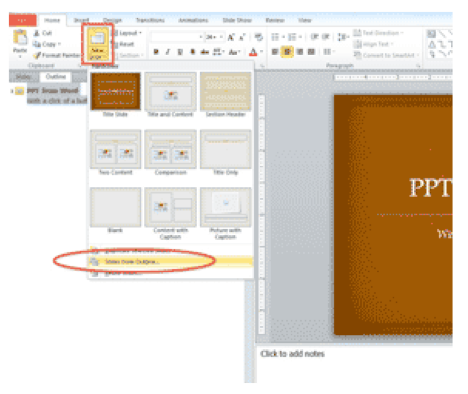
In a blank PowerPoint slideshow, click on the drop-down below NEW SLIDE. Choose SLIDES FROM OUTLINE. Navigate to the target Word file and open it.

Switch from Slide View to OUTLINE VIEW.

Your Heading 1 Styles are now slides. Your Heading 2 Styles are now bullets. Your Heading 3 Styles are now sub-bullets. Any Heading 4 and 5 Styles are indented under that.

Sometimes the converted content doesn’t come across exactly right. Click on the errant text and PROMOTE or DEMOTE the content to the correct indent levels.
Import Slides from OutlineJoin Our MS Office Training Community

For more MS Office training (including Excel Powerpoint Word training), click below to learn more about our MS Office classes, training videos, community and more!

microsoft office training


Picture of Alicia Katz Pollock
Alicia Katz Pollock
Recently named one of America's Top 50 Women in Accounting, Alicia is a leading expert in QuickBooks Online training with a Masters in Teaching and decades of business consulting. She offers a range of tailored resources from self-paced courses to personalized coaching. Known for her patience and commitment, Alicia simplifies QuickBooks for clients, helping them achieve their financial management goals with ease.
Picture of Alicia Katz Pollock
Alicia Katz Pollock
Recently named one of America's Top 50 Women in Accounting, Alicia is a leading expert in QuickBooks Online training with a Masters in Teaching and decades of business consulting. She offers a range of tailored resources from self-paced courses to personalized coaching. Known for her patience and commitment, Alicia simplifies QuickBooks for clients, helping them achieve their financial management goals with ease.
Don't forget to share this post.
Related Articles
QBOA for ProAdvisors
QuickBooks
Alicia Katz Pollock
Ditch the Desktop Drama: Unveiling the Hidden Gems of QBOA for ProAdvisors

Let’s face it, the recent news about QuickBooks Desktop phasing out has sent ripples of uncertainty through the bookkeeping and accounting world. But before you hit the panic button, let me assure you: millions of us have already embraced QuickBooks Online (QBO) – and for good reason. QBO isn’t just a web-based version of Desktop; it’s a whole new ball

Read More »
eCommerce
QuickBooks
Alicia Katz Pollock
Navigating the eCommerce Jungle: Integrating Your Online Sales with QuickBooks Online

Running an eCommerce business is exciting, but managing the financial side can feel like hacking your way through a dense jungle. Especially when it comes to integrating your eCommerce platforms with your accounting software, the options can be overwhelming. As a bookkeeper or small business owner, you need accurate, up-to-date financials, and that means getting your eCommerce sales data into

Read More »
QuickBooks Online Hacks
QuickBooks
Alicia Katz Pollock
QuickBooks Online Hacks

QuickBooks Online Hacks: Boost Your Efficiency with These Insider Tips Are you a QuickBooks Online user looking to streamline your workflow and save valuable time? This blog post is packed with insider tips and tricks, what I like to call “hacks,” to help you navigate QuickBooks Online more efficiently and effectively. Mastering the Interface: Hidden Tools and Shortcuts Let’s dive

Read More »