 A new report has hit the 24-Hour TV News Media proclaiming that “ALL Flashlight apps are malware,” tracking your every mobile move and sending it off to China, Russia and India for criminal purposes. Here is a video of supposed Cybersecurity Expert Gary Miliefsky from SnoopWall on the Brett Baier Show.
First off, CALM DOWN. This is another vulnerability we are going to file under “don’t believe the hype.” The biggest tip-off that this “expert” is not quite correct is the fact that his company SnoopWall has an app called Privacy Flashlight in the Google Play Store. They also sell an Android Security app. He is purposefully vague when he says the top 10 apps are suspect. He also specifically mentions the Google Play Store, but not the Apple iTunes Store, since his apps are not for sale there.
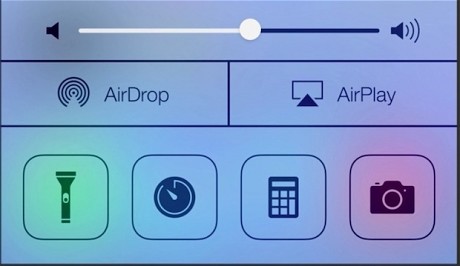 Now let’s talk why Apple users do not need to worry about such things. Apple has provided a built-in flashlight app on all iPhones running iOS 7 or iOS 8, so you do not need a third-party app flashlight any more. Swipe up from the very bottom of the screen to reveal the Control Center. Flashlight is on the far left. There is no built-in flashlight on the iPad yet, just the iPhone. Go ahead and delete all your third-party flashlights if you have any concerns.
Also, it has been reported that Android internal permissions do leave something to be desired. howtogeek.com says “Android app permissions are a mess,” but Apple permissions are not. On iOS, if an app you download wants access to any other app’s data, it has to ask permission. This technology is called “sandboxing.” Every app is kept in its own sandbox, meaning it is not allowed to play with the other apps by default. iOS notifies you if any app is trying to access any other app.
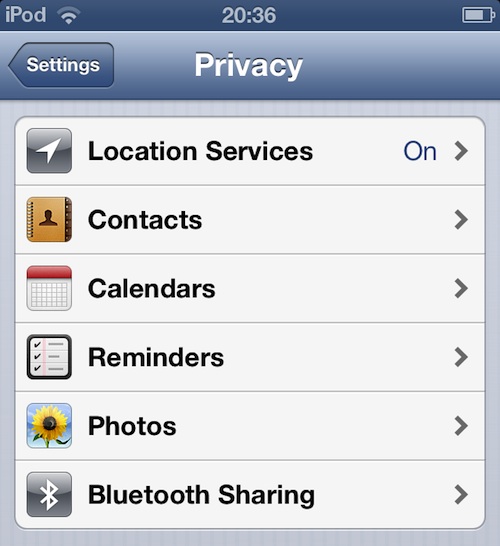 To prove this to yourself, head into the Settings app and look under Privacy. Location Services lists all the apps allowed to use the GPS portion of your phone. But that is not so that apps can track you, it’s so the app can give you better information based on your location. Good examples are Yelp and Fandango. If I want to find a restaurant or movie theater within a mile of me, these apps need to use my current location. In the Privacy section of Settings, you will also find Contacts. Tap on it to reveal a list of all apps that have access to the information in your Contacts app. Here you might find, for example, apps like CamCard, which scans business cards and then adds then to my Contacts.
If anyone finds the Flashlight app in either of these locations, please send me a screen capture by pressing the Sleep button and the Home button at the same time. Do not hold the buttons down, press and release; the screen will flash, you’ll hear the camera shutter sound, and then you can find the image in your recent photos in the Photos app.
This report reminds me of the big news a couple of years ago, that astrology was all wrong, that there was a new astrological sign, and that the system we have all been using was terribly flawed. It turns out the information was old news in the study of astrology, and some newby managed to make a national name for himself by creating a sensational press release which caught the eye of some news show running out of actual news.
 Stay Calm and iPhone!
Here a series of web resources for more information:
No, Your iPhone Flashlight is NOT Spying On You – howtogeek.com
* Look for links to multiple articles with more information about Android and Apple permissions
Flash and Grab – snopes.com
* Yes, I know snopes.com are just two people with no credentials doing web research but they seem to spread better info than the national news media so there you have it