Mirror Two Monitors But Not All of Them on a Mac

Mirror Two Monitors but not all of them

Table of Contents

Mirroring Monitors, But Not All of Them
Multiple Monitors
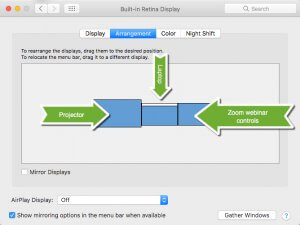
The normal 3-monitor setup

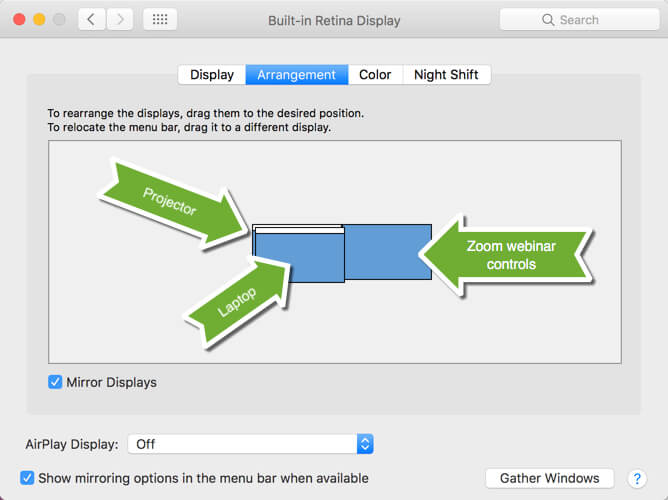
I present classes every week to a live audience and simultaneously webcast them. It poses a unique problem: How can I mirror just two of my monitors, but not all three?

I work on my laptop in front of me, and project it up to the screen in the room for the students attending in person.

I also need to have my Zoom webinar tools available to see the faces and/or the chat to answer questions from the people attending from home.

But when I turn on Mirror Displays on my Mac’s System Preferences, it takes over all three screens. So I’ve had to compromise by only having my screen up on the wall of the classroom, and my webinar tools on my laptop in front of me.

I haven’t been satisfied with explaining to the people watching the recording after-the-fact that I’m constantly looking up and to my left because I am looking at the screen and what I’m doing, then turning forward to the camera to talk to the audience. It’s been awkward, at least for me.

Previous searches for apps that would allow me to control which monitors are mirrored, and which are not, have been fruitless.

But in my last attempt to find a solution, I was finally successful! Since many of you also present workshops to audiences, I thought you would like to see this too.

The answer is…
Mirror Two Monitors but not all of them
Mirror two monitors but not all of them

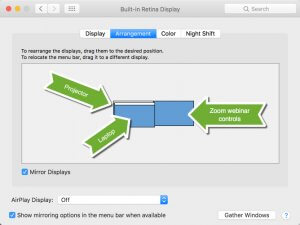
…on your Mac’s System Preferences > Displays, DON’T turn on Mirroring. Instead, hold down the Option Key and drag the two screens you want to mirror ON TOP OF EACH OTHER.

This allows my laptop and the projection screen to show the same content, and my webinar tools are on my third monitor on my right side.

So to the virtual online audience, I’m looking at them and talking to them. I can engage with the students in the class while working on my laptop, and they can see what I’m doing. And I can see the webinar participants and their questions when I glance to the right.

Everyone wins!

The Mac’s Option Key

I love that Apple builds complex solutions into their products in simple ways. True, there was no way for me to know that holding down the Option key would allow this to happen. But in past blog posts, I’ve emphasized that the Option key extends your Mac’s abilities in all kinds of delightful ways. In fact, here’s an article about the Option key that I wrote in 2010!

I encourage everyone to hold down the Option key while you click on various toolbar buttons and features. You never know when you’ll find the solution to your problem, or a solution to a problem you didn’t know you had.

Picture of Alicia Katz Pollock
Alicia Katz Pollock
Recently named one of America's Top 50 Women in Accounting, Alicia is a leading expert in QuickBooks Online training with a Masters in Teaching and decades of business consulting. She offers a range of tailored resources from self-paced courses to personalized coaching. Known for her patience and commitment, Alicia simplifies QuickBooks for clients, helping them achieve their financial management goals with ease.
Picture of Alicia Katz Pollock
Alicia Katz Pollock
Recently named one of America's Top 50 Women in Accounting, Alicia is a leading expert in QuickBooks Online training with a Masters in Teaching and decades of business consulting. She offers a range of tailored resources from self-paced courses to personalized coaching. Known for her patience and commitment, Alicia simplifies QuickBooks for clients, helping them achieve their financial management goals with ease.
Don't forget to share this post.
Related Articles
QuickBooks
Payden Miller
Author’s new book receives a warm literary welcome.

Author’s new book receives a warm literary welcome. Readers’ Favorite announces the review of the Non-Fiction – Business/Finance book “QuickBooks Online Bootcamp” by Alicia Katz Pollock, currently available at http://www.amazon.com/gp/product/0989399265. Readers’ Favorite is one of the largest book review and award contest sites on the internet. They have earned the respect of renowned publishers like Random House, Simon & Schuster,

Read More »
QBO Bootcamp Press Release | Blog Header Image | Royalwise
QuickBooks
Payden Miller
How QBO Bootcamp is Changing the Game for Small Business Owners

If you’ve ever felt overwhelmed by your business finances, you’re not alone. Managing books, keeping up with tax prep, and understanding accounting software can be daunting—especially for small business owners. But a new book by Alicia Katz Pollock, QBO Bootcamp: From Setup to Tax Time, is here to help—and it’s already receiving glowing praise. A 5-Star Guide That Makes Finance Manageable

Read More »
Two Accounting Apps | Blog Post Header Image | Royalwise
QuickBooks
Brandon Mateika
When Two Accounting Apps Listen to Their Customers (And Actually Do Something About It)

Picture this: It’s 2021 at ‘Appy Camp, and Ben Stein from Keeper is standing at a bar, drink ticket in hand, ready to exchange it for a well-deserved cocktail after a long day of conference sessions. But when Alicia Katz Pollock rushes past—bass guitar case slung over her shoulder, racing to join the evening’s music circle around the fire—and tosses him

Read More »