
 A few years ago, I was helping a client upgrade her Mac running OSX 10.5 Leopard, but she couldn’t remember her administrative password. Because she had an older computer, I couldn’t boot into OSX’s Recovery Disk and reset it from there – I had to go so far as to create a new Root User account and administer her account from there.
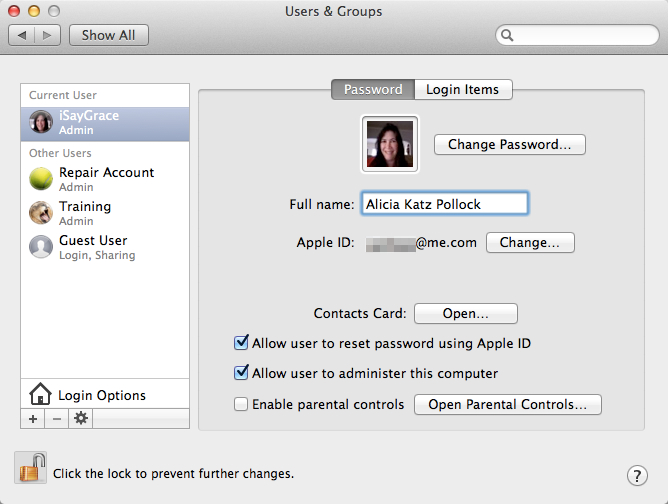
A few weeks ago, I was working on the same issue for a senior citizen and was overjoyed to make use of a feature introduced in OSX 10.7 Lion: Allow User to Reset Password Using Apple ID.
When you attempt to reset an administrative password, it asks for that current password. If you’ve forgotten it, which may be why you wanted to reset it in the first place, this is no help at all. With this new option, after your third attempt, you will be given an opportunity to log in using your Apple ID and password in order to make the change.
The good news is that if you’ve also forgotten your Apple ID password, you can reset that at https://iforgot.apple.com.
If you have an aging parent using a Mac, this new option may become quite handy.