 Have you recently started getting an incorrect password message when trying to access your Gmail account? There is a chance that Google is blocking your login because you are not running the latest operating system, and not using a Google product to access your Gmail.
As an Apple support professional who troubleshoots email issues on a daily basis, I’ve never really liked Gmail. It throws a wrench in the Mac gears by Archiving instead of Deleting. And its All Mail folder stores every email you have ever received, then syncs those old disregarded emails onto every device you use. IMHO, Gmail has become one of the worst options for Apple users. But I’ll go into more depth on that in a later blog post.
My current problem with the Gmail system has to do with them blocking sign-ins due to people using what they refer to as “less secure apps.” Those “less secure apps” refer to any email client that’s not made by Google and has not been upgraded to the very latest version.
This morning I was helping a client whose Apple Mail could not connect to her Gmail account. When we logged in, directly through the Gmail website, I found a series of emails letting the client know that they had been blocking their login attempts for a few months. Because these emails were sent to the Gmail account that Apple Mail could no longer access, she never saw them.
In those Blocked Sign-In Notification email messages, we read some very interesting new wording:
You can switch to an app made by Google such as Gmail to access your account (recommended) or change your settings so that your account is no longer protected by modern security standards.
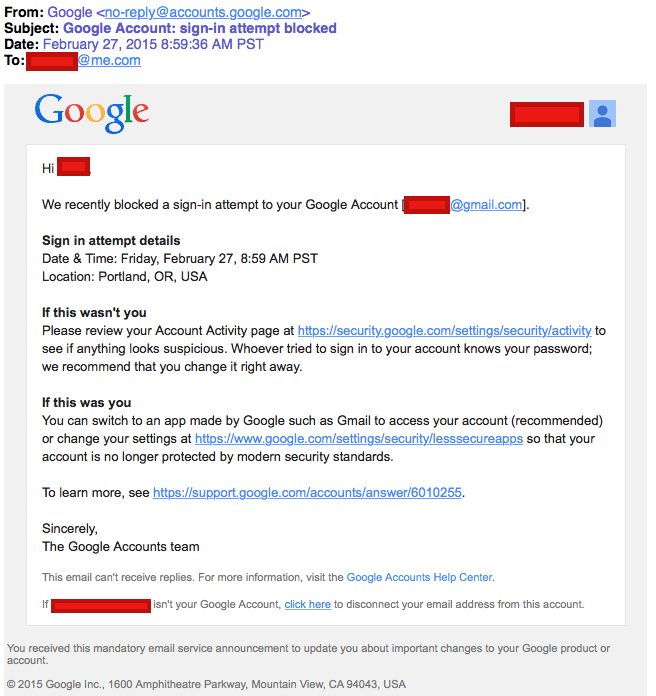
Wow, our options were to use a Google app, or go to a website with “lesssecureapps” in the URL, and agree to no longer use “modern security standards?” Apparently, Google has unilaterally declared that older copies of Apple Mail and Microsoft Outlook no longer support modern security standards. This is patently untrue.
This particular client was running OS X 10.7.5 Lion, but only had 4GBs of memory, so upgrading to OS X 10.10 Yosemite, with the most version recent Apple Mail, was not really recommended.
So we headed into her Gmail account settings to see what our options were. There, just under the always-troublesome 2-Step Verification option (which always locks out Apple Mail as well), is a setting for “Access for less secure apps” which is set by default to “Off”.
Thanks to Google for taking one out of the Facebook privacy settings playbook! Both of these companies have taken it upon themselves to make sweeping changes to people’s account settings without notifying them first. And if you do not monitor your settings (which no one does), you are out of luck.
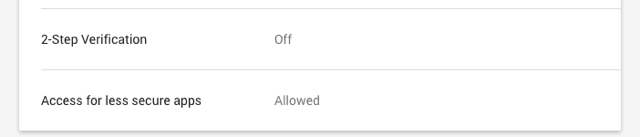
Once you change this insidious little setting to “Allowed,” you will then receive a follow-up email making sure you are aware of your extremely poor decision that now makes you more vulnerable to hackers… and once again offering to provide much better security by using a Google-specific product:
Please be aware that it is now easier for an attacker to break into your account. You can make your account safer again by undoing this change at https://www.google.com/settings/security/lesssecureapps, then switching to apps made by Google such as Gmail to access your account.

From Google’s support website, examples of apps that “do not support the latest security standards” include:
• The Mail app on your iPhone or iPad with iOS 6 or below
• The Mail app on your Windows phone preceding the 8.1 release
• Some desktop mail clients like Microsoft Outlook and Mozilla Thunderbird
One reason I love Apple is that they support open source concepts and universal Internet standards. Everyone on the Internet supports IMAP for email and Cal-Dav for calendars, so their systems can be leveraged in cross-platform environments. The iPad was originally designed to use Microsoft Exchange’s ActiveSync technology and, to this day, still supports it. In this case, Google is using a newer authentication protocol called OAuth, so older email clients do not support it.
Their concern is that by giving your credentials (username and password) to a third party, then they may take advantage of you. In this case, that third party is Apple! Google thinks you shouldn’t trust Apple?
Using older email software does not open you up to fraud any more than it did when it was new. This attempt by Google to force everyone to use their specific applications demonstrates just how proprietary they have become. This power grab preys on scared people who don’t understand (and don’t need to understand) what happens behind the scenes in their software.
If this is happening to you, give me a call at 503-504-6392 and I can walk you through the new settings.
Even better, move away from Gmail by taking advantage of the free email account that comes with your Apple ID! In your iCloud settings, turn on Mail, and create a brand new email address. It will immediately show up on your iPhone and Mac… because it’s meant to be there!
Email your friends to let them know your new email address, and log into the websites for companies where you need to update the address. It won’t take long, and it will be worth it. Until you’ve made the change everywhere, log into gmail.com to monitor your Gmail email.
To read more about the “danger” of “less secure apps” (according to Google), check out these articles:
Allowing less secure apps to access your account – support.google.com
What are the dangers of allowing “less secure apps” to access my Google account? – stack exchange.com
Read Why Gmail Sucks for Apple Users! Part 2
Related Posts
[related_posts limit=”4″ image=”150″]