How to Change Mac Password
Several years ago in between teaching my Mac training classes, I was helping a client upgrade her Mac running OSX 10.5 Leopard, but she couldn’t remember her administrative password. I had to go so far as to create a new Root User account and administer her account from there.
Three years ago, another client running OSX 10.6 Snow Leopard had it a little easier. I booted into her Recovery Disk and reset his password from there.
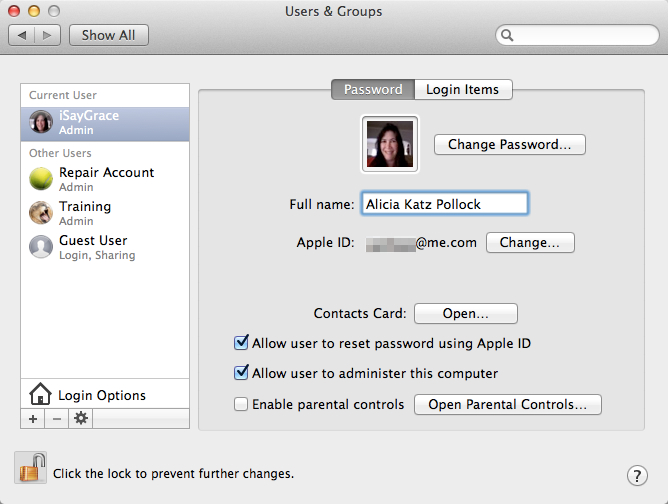
But Apple’s come a long way. Neither of those solutions were possible for a home user to figure out. This week I was working on the same issue for a senior citizen and was delighted to make use of a feature in OSX 10.9 Mavericks: Allow User to Reset Password Using Apple ID.
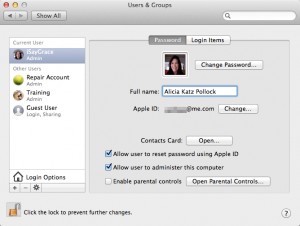
This option is turned on by default in the Users & Groups System Preferences pane. It’s worth confirming it now to make sure…while you still remember the administrative password! Take this precaution on your own computer, as well as your parents’ and children’s machines.
Interestingly, this option doesn’t come into play while you’re in the User & Groups pane. Even after clicking the Change Password… button, you’ll make infinite attempts without being offered the opportunity. That’s smart on Apple’s part, to deter hacking. Instead, log out of your User account completely by clicking on the Apple in the upper left corner of your screen, then choosing “Log out [Username].”
Then, when you try to log into your computer from the login screen, it will ask for the user’s current password. With this new option, after your third attempt, you will be given an opportunity to log in using your Apple ID and password in order to make the change.
The good news is that if you’ve also forgotten your Apple ID password, you can reset that at http://iforgot.apple.com.
If you have an aging parent using a Mac, this new option may become quite handy.
Want more Apple and Mac training?
Click below to check our our full suite of services related to Apple video training classes, 1:1 consulting and more!