Creating a Cover Page in Microsoft Word

Insert a Next Page Section Break

Table of Contents

The title on a cover page is traditionally located about 1/3 to halfway down the page. Have you found yourself pressing Enter repeatedly to get there? Don’t! Instead, follow these steps to center the page vertically, from top to bottom.

Formatting a Cover Page in Word

1. Insert a Next Page Section Break

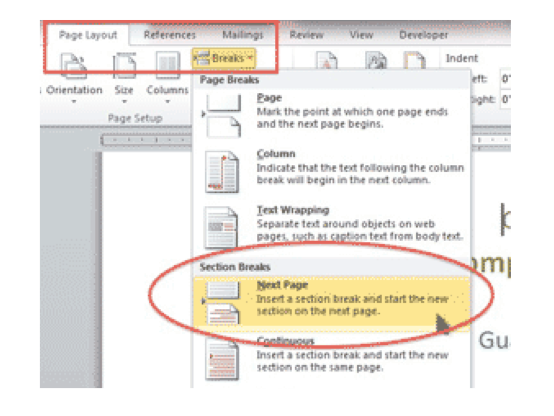
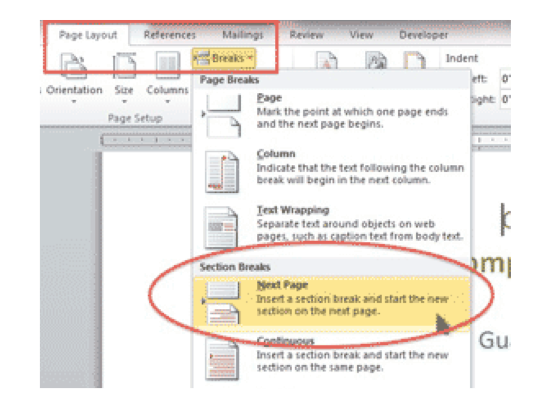
Click the cursor at the beginning of the text to appear on page 2. Go to the Page Layout?Breaks and click on NEXT PAGE in the SECTION BREAKS area.

Click back on the cover page.
Insert a Next Page Section Break

2. Center the Page Vertically

Go to the PAGE LAYOUT ribbon and click on the LAUNCHER BUTTON in the bottom right corner of the PAGE SETUP GROUP.

Change VERTICAL ALIGNMENT: to either Center or Justified.
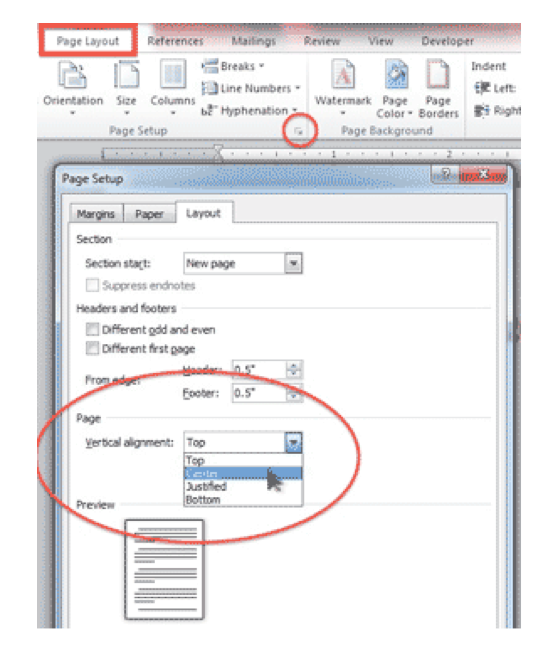
Center the Page Vertically

Center drops the text to the middle of the page from top to bottom, as shown in the first image. Justified spreads out the lines so that they are evenly spaced.

Justified

Buy the Book

Microsoft Word 2010 Tips & TricksFor the complete collection of time-saving tips and tricks, buy my book, Microsoft Word 2010 Tips & Tricks. Available in eBook, iBook, Multi-touch, and paperback versions.


Picture of Alicia Katz Pollock
Alicia Katz Pollock
Recently named one of America's Top 50 Women in Accounting, Alicia is a leading expert in QuickBooks Online training with a Masters in Teaching and decades of business consulting. She offers a range of tailored resources from self-paced courses to personalized coaching. Known for her patience and commitment, Alicia simplifies QuickBooks for clients, helping them achieve their financial management goals with ease.
Picture of Alicia Katz Pollock
Alicia Katz Pollock
Recently named one of America's Top 50 Women in Accounting, Alicia is a leading expert in QuickBooks Online training with a Masters in Teaching and decades of business consulting. She offers a range of tailored resources from self-paced courses to personalized coaching. Known for her patience and commitment, Alicia simplifies QuickBooks for clients, helping them achieve their financial management goals with ease.
Don't forget to share this post.
Related Articles
QBO Bootcamp Press Release | Blog Header Image | Royalwise
QuickBooks
Payden Miller
How QBO Bootcamp is Changing the Game for Small Business Owners

If you’ve ever felt overwhelmed by your business finances, you’re not alone. Managing books, keeping up with tax prep, and understanding accounting software can be daunting—especially for small business owners. But a new book by Alicia Katz Pollock, QBO Bootcamp: From Setup to Tax Time, is here to help—and it’s already receiving glowing praise. A 5-Star Guide That Makes Finance Manageable

Read More »
Two Accounting Apps | Blog Post Header Image | Royalwise
QuickBooks
Brandon Mateika
When Two Accounting Apps Listen to Their Customers (And Actually Do Something About It)

Picture this: It’s 2021 at ‘Appy Camp, and Ben Stein from Keeper is standing at a bar, drink ticket in hand, ready to exchange it for a well-deserved cocktail after a long day of conference sessions. But when Alicia Katz Pollock rushes past—bass guitar case slung over her shoulder, racing to join the evening’s music circle around the fire—and tosses him

Read More »
QuickBooks Online Training Blog | Header Image | Royalwise
QuickBooks
Alicia Katz Pollock
The QuickBooks Online Training Revolution Has Begun

(Watch the video above to hear the full story straight about QuickBooks Online Training from Alicia Katz Pollock.) The accounting industry is undergoing a seismic shift. What used to be a solo bookkeeper’s job is now handled by entire departments inside CAS practices and tax firms. The pressure is on for staff at all levels to really know what they’re doing in

Read More »