DO NOT TRUST ANY RANDOM POP-UP WINDOWS WHEN YOU ARE ON THE INTERNET! DO NOT CALL ANY 1-800 NUMBERS FROM UNKNOWN SOURCES TO GET YOUR COMPUTER SECURED!
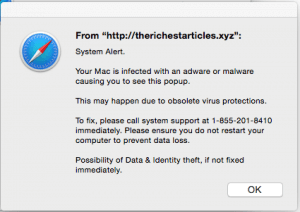 There is a major scam going around that is tricking people into paying anywhere from $400 to $700 for security protection on their Apple computers. You do not need this service. They just want your money.
I have had multiple clients fall for this. They have either had to cancel their credit card and stop the payment, or have just lost the money.
Feel free to call me instead of the toll free number, and I will make sure your computer is alright.
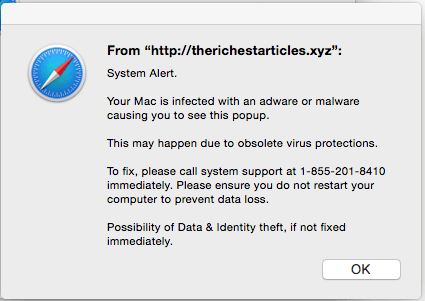
When you misspell a domain name, scammers are hijacking your web site requests. They redirect you to a site with a pop-up a window that locks up your browser, making it seem like something is terribly wrong with your machine.
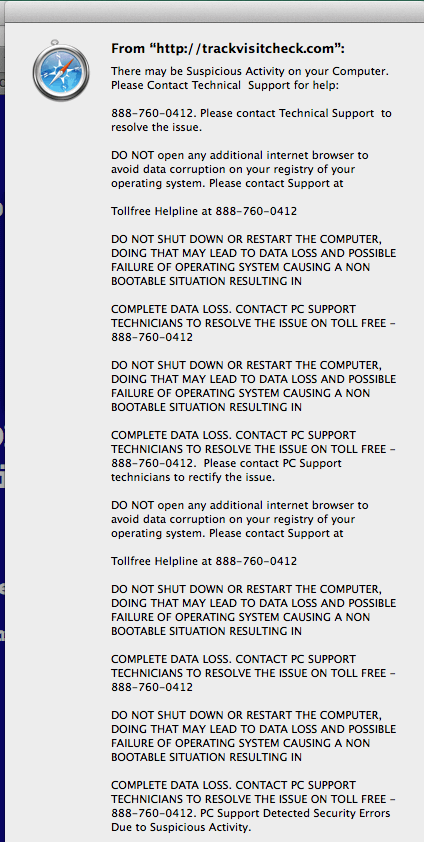 On the pop-up window, there will be a claim that your machine has been compromised and that you need to call the toll-free number provided to get it resolved.
THIS IS NOT APPLE SUPPORT. THIS IS NOT SOMEONE YOU CAN TRUST. YOUR COMPUTER IS FINE!
The message is a bogus claim to scare you. Your computer has not been compromised; they have just locked up Safari so you can not close the window!
If you call the number, they will talk you into allowing them access to your computer through a screen share. They then show you the Activity Monitor and point to simple everyday processes as evidence that your computer has a major issue, which it does not. They are praying on everyone’s limited understanding about how their computers work.
To fix the locked up browser, shut down your computer. In the shutdown confirmation, make sure that the “Reopen windows when logging back in” checkbox is UNCHECKED. If that box is checked, then Safari will just reload the scam website.
If you need my assistance dealing with this issue, please give me a call at 503-504-6392. I’ll be happy to help.