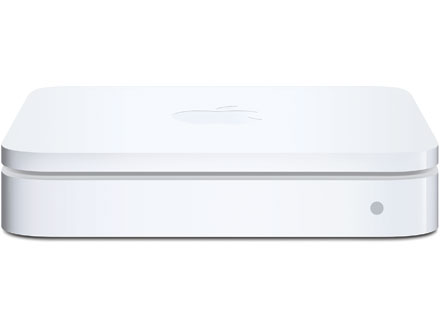
 I’m frequently asked if the built-in wireless of a Comcast or Century Link modem is comparable to an Apple Airport wireless router. One of mantras when dealing with technology is: “Apples to Apples and I can guarantee it will work; Apples to Oranges and I’m just not sure what to expect, especially over time.” For this reason, I always recommend using an Apple product like a Time Capsule, AirPort Express, or AirPort Extreme to create a wireless network in your home or office. They are easy to setup, and, if you want to extend your network, adding new hotspots strategically around the house is even easier using the built-in Airport Utility app.
But beyond a simple desire to use complimentary technology, the other main reason I recommend Apple Wi-Fi routers is their ability to provide “Dual Band” wireless frequencies. Wireless networks can run at two different frequencies: 2.4 GHz and 5.0 GHz. iPhone 4s can only connect to a 2.4 GHz frequency. iPhone 5 and above, iPad 2 and above, and Mac desktops can connect to 5.0 GHz frequency.
2.4 GHz has a wider range, meaning it can reach farther. It’s also more susceptible to interference due to only having 3 non-overlapping channels for transmission, which are crowded due to other interfering devices, including your neighbor’s Wi-Fi access point, microwave ovens, cordless phones, Bluetooth devices, and baby monitors. All that noise increases interference and degrades your network performance. 5.0 GHz has a more limited range, but a stronger signal within that distance. It has less interference with 23 non-overlapping channels, which makes it more stable for applications like video streaming and gaming.
Many routers handle this two-frequency issue one of two ways. First, they simply throttle down and only offer 2.4 GHz. This is the lowest common denominator approach, leaving your capable devices well below their potential. The second approach is to create two physically separate wireless networks, one at each frequency. This is the cause of the “Why can’t my iPad or iPhone see my Apple TV or Macbook Pro?” problem which can make AirPlay unusable. Netgear refers to this as Simultaneous Dual Band vs. Selectable Dual Band, touting that their Simultaneous Dual Band “provides the ultimate in flexibility and performance by providing two independent, dedicated networks,”except that you can’t see your Apple TV from your iPhone.
All Apple wireless routers seamlessly switch between 2.4 GHz and 5.0 GHz on one network. You only have a single network available, and your devices will connect to it with the optimal frequency at that time. This allows all devices to see each other on the network and access the best frequency for that device.
Now, back to the question about whether to use the built-in Wi-Fi that comes with your Comcast Cable modem or your Century Link DSL modem, or to spend the extra money and use an Apple wireless router. It took a bit of searching but I finally found a page on the Comcast website that addresses this issue. They offer two routers referred to as “the Wireless Gateway 1 (model numbers TG852G, TG862G, SMCD3GNV and TC8305C) and the Wireless Gateway 2 (model number DPC3939).” Gateway 1 is 2.4 GHz only, and Gateway 2 is Dual-Band and switches between 2.4 GHz and 5.0 GHz automatically.
Question: Have you ever had a Comcast tech ask you if you had a preference?
Leave a comment and let me know if your existing Comcast modem is Dual Band or not!
I’ve installed dozens of new Comcast routers since they doubled their bandwidth last year, and even I didn’t know this distinction until recently. With Apple, you know what the device is capable of and what to expect from it.
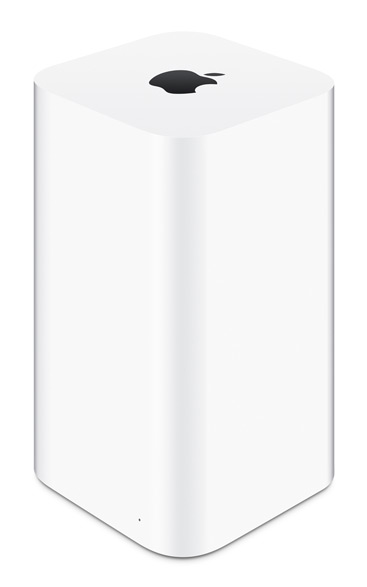 Here are a few more tips if you have Comcast Internet service. First, if you do have an Apple Time Capsule or AirPort Extreme providing your wireless network, do you also have a Comcast Wi-Fi modem? If so, you can trade it in for a plain Comcast modem, and save yourself a few dollars every month. If you don’t, and are relying on your Comcast as your home wireless network, how long have you had your Comcast service? If it’s been more than a few years, you can exchange that old, outdated Comcast modem for a new one at no charge! All you have to do is ask.
For more information about wireless technology, including types of interference such as microwave ovens and metal walls, plus Netgear’s approach to Dual Band wireless networks, please refer to the articles below. If you decide to do some web research, (I always recommend you do your due diligence), please note the date of the articles. There’s a ton of information addressing this issue, but the majority of the articles are from 2008-ish, when the technology first hit the market and was big news, and are now outdated. Happy surfing!
What is Dual Band Wireless Networking? – about.com
iOS and OS X: Recommended Settings For Wi-Fi Routers and Access Points – support.apple.com
Wi-Fi and Bluetooth: Potential Sources of Wireless Interference – support.apple.com
Why Choose Simultaneous Dual Band? – netgear.com
The Different Wireless Gateways for Your Home Network – comcast.com